



Let me be honest with you. I am not a good note-taker.
Never have been. In meetings, I’d be halfway through writing one sentence when the conversation had already moved three topics ahead. During interviews, I’d miss the best quotes because I was too busy scribbling. After lectures, I’d stare at a page of half-finished bullet points and wonder what any of it meant.
For a long time, I thought this was just a personal failure. A discipline problem. Something I needed to fix about myself.
Then I started using audio to text tools — and I realized the problem was never me. The problem was that human brains aren’t designed to listen deeply and write accurately at the same time. Once I stopped fighting that, everything changed.
The Moment It Clicked for Me
The first time I ran a recorded interview through an automatic transcription tool, I genuinely didn’t trust the output. I sat there reading the transcript with the audio playing in the background, waiting to catch it making mistakes.
It made a few. But 94% of it was right on the first pass — and that 94% would have taken me three hours to produce manually. The tool did it in ninety seconds.
That was the moment I stopped thinking of audio to text as a gimmick and started treating it as a core part of how I work.
If you’ve had a similar experience — or if you’re still on the fence — I want to share what I’ve learned after using these tools consistently for the past two years. Not the marketing version. The real version.
What Nobody Tells You About Speech-to-Text Conversion
Here’s something the product pages don’t always say clearly: the quality of your output depends heavily on the quality of your input.
Speech-to-text conversion engines — even the best ones — struggle with overlapping voices, heavy background noise, strong regional accents, and low-quality microphones. That’s not a flaw. That’s just physics. Audio signals carry information, and when that information is degraded, accuracy drops.
The practical fix is simpler than you might think. A decent USB microphone, a quiet room, and the habit of speaking at a measured pace will push your transcription accuracy from mediocre to excellent without changing the tool at all.
I learned this the hard way after running six months of podcast interviews through a transcription tool and getting inconsistent results. The problem wasn’t the software. It was that half my guests were calling in on speakerphone from loud cafes. Once I started coaching guests on audio setup before we recorded, my transcripts became dramatically cleaner.
You can’t fully outsource quality. But you can set yourself up to get the most out of it.
The Use Case That Surprised Me Most
I expected audio to text to save me time on transcription. What I didn’t expect was how much it would change the way I write.
Here’s what I mean. When you have a full transcript of a conversation, interview, or brainstorm session, you’re not just saving notes — you’re capturing raw thinking. Unfiltered ideas. The kind of things people say out loud that they’d never type into a document.
I started using transcripts as first drafts. I’d talk through an article idea out loud, convert the audio to text, and then edit the transcript into a finished piece. The result was writing that felt more natural and conversational — because it literally started as conversation.
If you’re a writer, marketer, or content creator, I’d encourage you to try this approach at least once. Record yourself talking through your next piece for ten minutes. Run it through a transcription tool. Then read what comes back. You might be surprised how much usable material is already there.
Where the Industry Is Heading
Right now, we’re in what I’d call the accuracy plateau phase of audio to text development. The best tools have reached a level of transcription accuracy that’s genuinely competitive with human transcriptionists for clean audio. The next wave of innovation isn’t going to come from making transcripts more accurate — it’s going to come from making them more useful.
We’re already seeing this with tools that layer speaker diarization (the ability to tell speakers apart), sentiment analysis, and automatic summarization on top of raw transcripts. Instead of getting a wall of text, you get a structured document with key moments flagged, action items pulled out, and a summary at the top.
For teams running regular meetings or calls, this kind of intelligent transcription is genuinely transformative. You stop treating the transcript as an archive and start treating it as a working document.
My prediction: within three years, manually written meeting notes will feel as outdated as printing out directions before a road trip. The infrastructure is already there. It’s just a matter of adoption catching up.
The Tools I Actually Use
I’ve tried more transcription tools than I can count at this point. Some are fast but inaccurate. Some are accurate but slow. Some have great interfaces but export formats that don’t play well with the rest of my workflow.
The ones that stick around in my toolkit share three qualities: they’re fast, they handle real-world audio conditions without falling apart, and they get out of your way. You shouldn’t have to fight your tools.
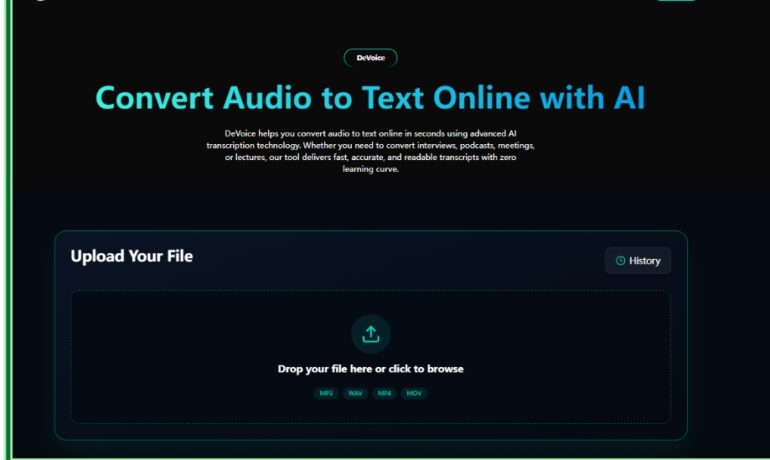
DeVoice has earned a permanent spot in my workflow for exactly those reasons. The audio to text accuracy holds up even on recordings that aren’t studio-quality, and the export options mean I can drop transcripts directly into whichever platform I’m working in that day. If you haven’t tried it yet, it’s worth fifteen minutes of your time.
Beyond DeVoice, my honest advice is to match the tool to the task. Real-time transcription for live meetings. Batch processing for long-form audio files. A dedicated tool with subtitle export for video content. One tool rarely does everything perfectly — and that’s fine.
What I’d Tell Someone Just Starting Out
Stop overthinking the setup and start with whatever audio you already have sitting on your hard drive. An old podcast episode. A recorded Zoom call. A voice memo from your phone.
Run it through an audio to text tool. Read the output. Notice what’s useful and what isn’t.
That feedback loop — messy, imperfect, real — will teach you more about how to use these tools effectively than any tutorial will.
The best workflow is the one you actually use. And in my experience, once you start converting audio to text regularly, you wonder how you ever managed without it.
When you’re ready to build that habit properly, DeVoice is a solid place to start. Clean interface, reliable output, and none of the friction that makes people give up on new tools before they see the results.
Try it. Take notes. Or better yet — don’t. Let the tool do it for you.