



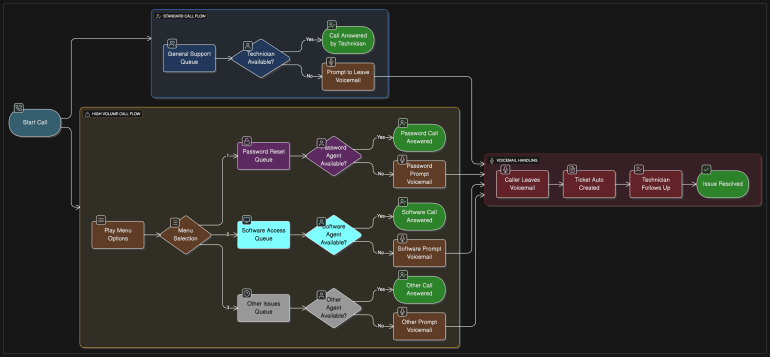
Visual Impact: AI Flowchart Tools That Level Up Your Projects
Introduction: Hook the Reader With Dynamic Visuals and Fast Workflow
Picture this. You’ve got a project kickoff in forty-five minutes. Your process documentation exists as a wall of text in a Word file, your data is buried in a PDF nobody wants to read, and your team is about to sit through yet another meeting where someone shares their screen and walks through a spreadsheet row by row.
Sound familiar? Yeah. We’ve all been there.
Here’s the thing — it doesn’t have to be that way anymore. The era of sitting through text-heavy presentations and hand-drawn diagrams that look like they were sketched on a napkin is officially over. AI flowchart tools have entered the chat, and they’re changing the game in ways that are genuinely exciting.
We’re talking about tools that take your messy documents, your dense PDFs, your scattered notes — and turn them into sharp, dynamic, interactive visuals in the time it takes to make a cup of coffee. No design degree required. No hours of dragging shapes around a canvas. Just clean, professional diagrams that actually communicate what you’re trying to say.
If your projects deserve better than static screenshots and confusing text docs — and they do — this is the article for you. Let’s get into it.
How Creativity Meets AI
Here’s something worth appreciating: the best ideas don’t always start as polished documents. Sometimes they start as a rough paragraph typed out on a phone. Sometimes they live in a spreadsheet that only the person who built it fully understands. Sometimes they’re trapped inside a scanned PDF that’s been sitting in a shared drive for two years.
AI doesn’t care. That’s the beautiful part.
Modern AI flowchart tools are built to meet your ideas wherever they currently live — and transform them into something visual without making you jump through hoops first. Feed the AI a block of text describing your sales process, and it builds a flowchart. Upload a spreadsheet full of project phases and dependencies, and it maps them into a timeline. Drop in a PDF report, and it extracts the logic and renders it as a diagram you can actually present.
The creative leap that used to require a skilled designer or a patient afternoon now happens in seconds. And the results aren’t generic clip-art diagrams — they’re structured, logical, and genuinely reflective of the content they’re built from.
What makes this particularly powerful for creative and project-driven teams is the freedom it unlocks. When visualization stops being a time-consuming task and becomes an instant output, you can experiment more. You can try different diagram structures, explore alternative process flows, and iterate on ideas visually rather than just talking about them. That shift — from visualization as a deliverable to visualization as a thinking tool — is where AI genuinely changes how creative work gets done.
And for teams dealing with data locked inside PDFs and image files? Tools like FlowChartAI handle the full pipeline — from raw input to polished visual — without requiring you to convert, reformat, or manually re-enter a single piece of information. Your content, your creativity, the AI handles the rest.
Innovative Features That Turn Heads
Let’s talk about the features that are actually making people stop and say “wait, it can do that?”
Dynamic Timelines
Forget the static Gantt chart that nobody updates after week two. AI-powered dynamic timelines adapt to your content, automatically laying out phases, milestones, and dependencies based on the information you provide. Change the source data, and the timeline updates. It’s living documentation — and it looks sharp enough to drop straight into a client presentation.
Auto-Layouts That Actually Make Sense
One of the most underrated features in modern AI diagram tools is intelligent auto-layout. Rather than dumping all your nodes in a pile and making you drag them into position manually, the AI arranges everything logically from the start. Sequential processes flow left to right. Decision trees branch cleanly. Hierarchical structures stack with proper spacing. The result is a diagram that communicates structure visually before anyone reads a single label.
Interactive Zooming and Navigation
Static diagrams have a ceiling. Once a process gets complex enough, a static image becomes either too small to read or too large to navigate. Interactive diagrams solve this elegantly — viewers can zoom into specific sections, collapse branches they don’t need, and explore the parts that are relevant to them. For complex project workflows, system architectures, or multi-stage processes, this interactivity isn’t just a nice touch. It fundamentally changes how the diagram gets used.
Drag-and-Drop Editing
Artificial intelligence creates the first draft, which will often be a fairly good one. However, each project will have its own characteristics, and when you can intuitively alter a diagram with simple drag and drop functionality, it means you are never limited to an output that you cannot modify. That may include moving nodes, reconnecting branches, or reordering a sequence of nodes without needing to access code or mess with complicated menus.
Real-Time Visual Collaboration
For teams, one of the most exciting capabilities of online diagramming is the ability for them to all work together on visual diagrams at the same time. Rather than having one person create a diagram and then share it as a static image, multiple team members can view, comment on, and add to the visual at the same time. This leads to quicker idea generation, less chance of misunderstanding, and everyone walking away with the same mental picture of the project. This might seem like a small advantage — but it is the difference between a productive meeting and one that simply wastes an hour.
Multi-Format Input
Perhaps the most practically impactful feature for day-to-day use is broad input compatibility. The best tools accept images, PDFs, Word documents, spreadsheets, PowerPoint files, and plain text — processing each format intelligently rather than just accepting it as a file upload. For teams who need to transform PDF to Excel as part of their workflow before visualizing data, having that capability built into the same platform as the diagramming tool removes an entire category of friction from the process.
FlowChartAI Spotlight
If there’s one tool that embodies everything described above — the multi-format input, the intelligent generation, the interactive output, the practical versatility — it’s FlowChartAI. And it earns that position not through marketing language but through what it actually does when you put real documents in front of it.
It Starts Where Your Work Already Is
The first thing that stands out about FlowChartAI is that it doesn’t ask you to prepare anything. There’s no required format, no template to fill out, no structured data input required. You bring what you have — a PDF, a JPG, a Word document, a spreadsheet, a paragraph of text — and FlowChartAI figures out the rest.
For teams dealing with documents that arrive in inconsistent formats — scanned reports, image-based files that need a JPG to PDF conversion step before other tools will even accept them, legacy documentation in outdated formats — this input flexibility is genuinely liberating. The tool meets you where you are instead of demanding you come prepared.
The AI Actually Interprets Your Content
There’s a version of “AI-powered” that means autocomplete. FlowChartAI’s AI actually interprets document content — recognizing process sequences, identifying decision points, understanding hierarchical relationships, and building diagrams that reflect the logic of the source material rather than just its surface text.
Upload a process description and you get a flowchart where decision nodes branch correctly and sequential steps connect in the right order. Upload a project timeline document and you get a visual timeline with phases laid out logically. The AI isn’t guessing — it’s reading.
Diagram Variety That Matches Real Project Needs
Not every project needs a flowchart. FlowChartAI supports a range of diagram types — mind maps for brainstorming sessions, timelines for project planning, org charts for team structures, process diagrams for operational documentation. The flexibility to generate the right type of visual for the specific need makes it useful across a much wider range of project scenarios than single-format tools.
Data Extraction That Connects to Visual Output
For project teams working with data-heavy PDFs — financial reports, research summaries, operational metrics — FlowChartAI’s ability to extract structured data into Excel format and simultaneously generate visual diagrams from the same source is a significant workflow advantage. Converting a PDF to xlsx or extracting tables into a clean PDF to Excel format no longer requires a separate tool and a separate workflow step. It’s part of the same session.
Outputs Built for Sharing
FlowChartAI diagrams aren’t just for internal use. Interactive outputs can be shared with stakeholders, embedded in documentation, or presented in real time. Static exports are available for archiving or dropping into presentations. The flexibility to move between interactive and static output formats means the tool adapts to how the diagram needs to be used — not the other way around.
Action-Ready Examples
Sometimes the best way to understand a tool’s value is to see it in a specific situation. Here’s how FlowChartAI plays out in real project scenarios:
The Product Launch That Almost Drowned in Docs
A product team has a launch process documented across three Word files, a PDF timeline, and a spreadsheet of dependencies. Normally, turning this into a presentable visual would take a dedicated afternoon. With FlowChartAI, each document gets uploaded separately, diagrams are generated from each, and the team spends their time reviewing and refining rather than building from scratch. The launch timeline goes from scattered documents to a shareable interactive diagram in under an hour.
The Research Report Nobody Could Navigate
An analyst receives a 60-page PDF research report full of process descriptions and data tables. The tables need to go into Excel for further analysis — and the process sections need to be visualized for a stakeholder presentation. FlowChartAI handles both in the same session: tables extracted into clean spreadsheet format, process sections turned into flowcharts. The analyst presents findings with visuals that actually communicate what the research says, rather than forcing stakeholders to read dense paragraphs.
The Remote Team That Needed a Shared Mental Model
A distributed team spread across four time zones is aligning on a new customer onboarding process. Instead of a text-heavy document circulated by email, the team lead uploads the process description to FlowChartAI and shares the interactive diagram. Team members in different time zones explore it asynchronously, leave annotations on specific nodes, and arrive at the alignment call already on the same page. The call takes twenty minutes instead of an hour.
The Student Presentation That Stood Out
A university student is presenting a complex research methodology to their class. Rather than talking through a multi-step process verbally or sharing a text outline, they use FlowChartAI to generate an interactive methodology flowchart from their written research notes. The visual communicates the process clearly, the interactive format lets classmates explore specific sections, and the presentation stands out from every other slide deck in the room.
Conclusion: FlowChartAI Helps Creators Communicate Complex Concepts Clearly and Quickly
Here’s the bottom line: complex ideas deserve clear visuals. And clear visuals shouldn’t require a design team, a full afternoon, or a specialized skill set to produce.
AI flowchart tools have genuinely democratized visual communication. The features that once defined expensive enterprise software — dynamic layouts, interactive diagrams, intelligent document processing, real-time collaboration — are now accessible to students, freelancers, small teams, and large organizations alike.
FlowChartAI sits at the center of this shift by combining what most teams actually need: a tool that accepts the documents they already have, understands their content intelligently, and produces visuals that are sharp enough to present, flexible enough to edit, and interactive enough to actually explore.
Whether you’re managing a product launch, documenting a business process, analyzing a research report, or just trying to turn a chaotic project into something your team can rally around — the visual impact is real, the workflow improvement is measurable, and the days of sitting through text-heavy meetings are numbered. Level up the project. Lead with the visual.