



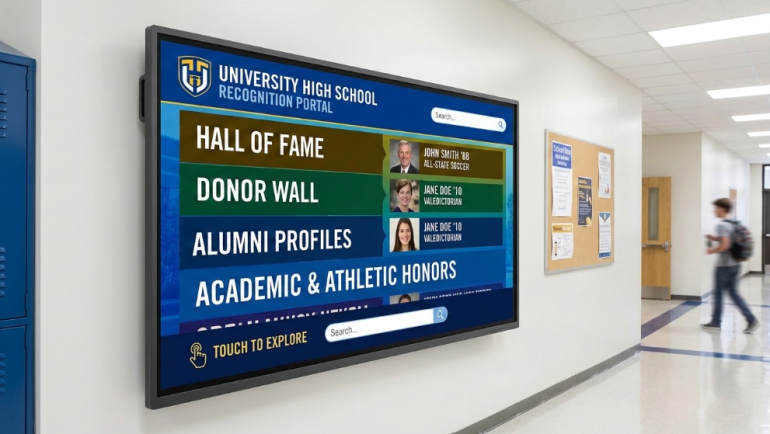
Schools invest heavily in interactive touchscreens for their lobbies, athletic centers, and main hallways. The hardware usually looks impressive on installation day. The screens are bright and the community is excited. But walk through those same hallways six months later and you often see a different story. Many screens sit blank, display error messages, or show outdated honoree information from the previous academic year.
The actual failure point is rarely the commercial hardware. It is almost always the content management system powering the display.
When you ask an administrative assistant or an athletic director to update a donor wall, they need a system that makes sense intuitively. They have full-time jobs. If the CMS requires a graphic design background just to add a new hall of fame inductee, those updates simply do not happen. I’ve seen expensive installations turn into powered down black glass because the backend software was too frustrating for the staff to use.
These are the top seven platforms for managing school interactive touchscreens, ordered by how they approach the specific needs of institutional recognition.
1. Touchstone Digital Solutions
When it comes to institutional recognition, Touchstone Digital Solutions stands apart because they do not force you into a prepackaged template. They focus exclusively on custom Hall of Fame, Donor Wall, and Team Wall installations specifically for schools, universities, and nonprofits.
- Deployment Style: Fully managed custom software build
- Best Fit For: Institutions wanting a fully branded, hands-off experience
- Notable Feature: The CMS is built exclusively around your specific history and branding
Many vendors hand over a blank software canvas and expect your team to figure out the user interface. Touchstone approaches this differently by designing the entire honoree content structure for you. Non-technical staff can easily add new athletes or update donor profiles without accidentally breaking the layout. This provides a purpose-built system and dedicated ongoing support.
2. Rise Vision
Rise Vision offers a comprehensive cloud platform for digital signage, screen sharing, and emergency campus alerts. They maintain a massive library of templates that include basic hall of fame boards and donor walls.
- Deployment Style: Cloud-based signage platform
- Best Fit For: Schools needing a low-cost entry point for general campus signage
- Notable Feature: Instant multi-device updates from any location
Because recognition boards are just one small category within a broader product built for hallway announcements, the templates are comparatively generic. It provides a reasonable starting point if you just need to get names on a screen quickly. Institutions wanting a distinctive tribute will find they need significant manual customization to make the out-of-the-box templates look like a premium installation.
3. Digital-Trophy-Case.com
This company sells interactive touchscreen donor wall and recognition kiosks. They generally focus on displays in the 43 to 65 inch range, combining fixed hardware packages with a cloud-managed software backend.
- Deployment Style: Managed touchscreen kiosk package
- Best Fit For: Organizations wanting a quick, hardware-bundled directory
- Notable Feature: Searchable cloud-managed honoree profiles
Their offering centers heavily on the kiosk hardware itself and providing a functional, searchable directory of names. They prioritize simple lookup features over deep visual customization. It functions much more like a digital catalog than a custom storytelling platform.
4. Intuiface
Intuiface is a robust no-code interactive signage platform used globally for corporate exhibits, retail kiosks, and complex digital signage. It excels at handling broad interactivity, including multi-touch and external sensors.
- Deployment Style: Self-managed no-code platform
- Best Fit For: Schools working with a dedicated digital AV integrator
- Notable Feature: Blends video, high-resolution images, and touch navigation seamlessly
This platform is incredibly powerful under the hood. It functions fundamentally as a horizontal tool for digital agencies rather than a recognition-specific product. There is no dedicated honoree database or alumni profile structure built into the base system. Every interaction has to be custom-built for your specific deployment. You will absolutely need internal design expertise or a contracted outside integrator to actually build a functional hall of fame experience on top of the framework.
5. Nevco
Nevco is widely known as a premium athletic scoreboard and facility branding manufacturer. They also offer digital wall of fame displays that bundle with their broader gym and stadium facility work.
- Deployment Style: Hardware bundle in wall mount, floor stand, or enclosure formats
- Best Fit For: Athletic departments already contracting Nevco for stadium scoreboards
- Notable Feature: Integrates easily with existing athletic facility branding projects
Recognition displays are a secondary product line for them. Their offering leans heavily toward the physical hardware side of the equation. The software backend is less robust than platforms built specifically around honoree storytelling. It is a convenient add-on if you are already outfitting a new gymnasium, but the CMS is not the primary focus of their business model.
6. Norvision
Norvision focuses specifically on bespoke donor recognition software. Their system is designed to help organizations manage and display giving programs through interactive video walls.
- Deployment Style: Managed donor recognition platform
- Best Fit For: Organizations strictly focused on donor and capital campaign recognition
- Notable Feature: Scales efficiently for both large and small giving programs
Their operational focus is narrowly targeted on donor recognition. They do not typically cover hall of fame, alumni directories, or athletic honors in the same integrated system. For pure donor recognition and capital campaign tracking, they provide a solid software backend.
7. PandaSuite
PandaSuite operates as a no-code platform that lets you build interactive apps and touchscreen kiosk experiences without needing a software developer. It provides a highly flexible drag-and-drop design environment.
- Deployment Style: Self-managed no-code platform
- Best Fit For: Teams with the time, budget, and design skills to build their own interface
- Notable Feature: Absolute creative control over the visual layout
This is a versatile builder used across dozens of different industries. That flexibility is a major strength if you happen to have an internal creative team. A school wanting an interactive hall of fame has to design the honoree database structure, donor tiers, and screen logic entirely from scratch. You start with a blank canvas, meaning ongoing content design falls entirely on your own staff.
Making the Right Choice for Your Staff
Choosing the right platform comes down to taking an honest look at your internal resources. The physical hardware is just the delivery mechanism. The software dictates whether the project lives on for years or becomes a daily frustration.
Look for a CMS that allows users to type in text, upload a photo, and hit publish without ever touching the visual layout. Focus on finding a software partner that aligns with your actual staff capacity to manage the screen long after the initial installation is complete.