


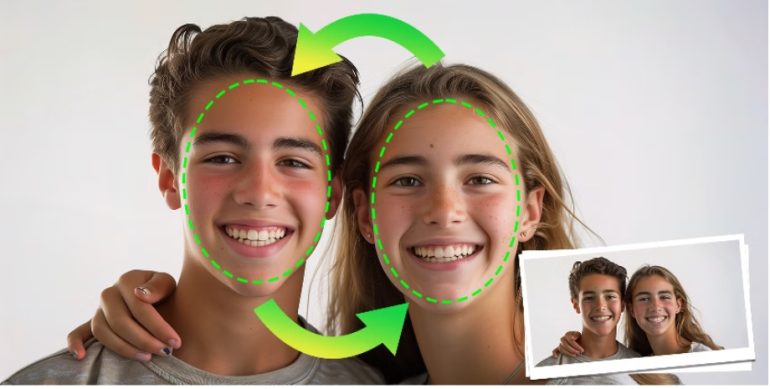
AI face swapping has gone from a novelty filter to a serious production tool. Brands use it to localize spokesperson videos for different markets, creators use it to speed up social content, and indie filmmakers use it to test casting ideas before a camera ever rolls. The technology has matured fast, too. Modern tools track facial movement, lighting, and skin tone far more convincingly than the apps that started the trend a few years ago.
The real challenge in 2026 isn’t finding a face swap tool; it’s finding a good one. Output realism, photo-and-video support, pricing transparency, and ease of use still vary enormously across platforms. We tested the AI face swap tools creators talk about most this year and ranked them on realism, versatility, and overall value. Here’s our list, starting with the one that impressed us most.
At a Glance
| Rank | Tool | Best For | Starting Price | Standout Feature |
| 1 | Magic Hour | All-in-one photo & video face swap | Free | No signup to try, credits that never expire |
| 2 | Reface | Quick, fun swaps on mobile | Free (in-app credits) | Huge meme and GIF template library |
| 3 | DeepSwap | Long-form video face swap | ~$19.99/month | Bulk video processing |
| 4 | Remaker AI | Photo-based face swap | Free / paid credits | Multiple swap styles per upload |
| 5 | AKOOL | Marketing & brand video | Custom pricing | Enterprise-grade brand controls |
| 6 | Vidnoz AI | Beginners wanting a full editor | Free / paid plans | Built-in video editing suite |
| 7 | Wondershare Filmora | Editors who want swap as one feature among many | ~$19.99/month | Full timeline-based editor included |
Prices reflect publicly listed rates at the time of writing and may change.
1. Magic Hour — Best Overall AI Face Swap Tool
Magic Hour tops our list because it treats face swapping as part of a complete content pipeline rather than a single trick. You can swap faces in photos and video, sync lips to new audio, or turn a single picture into a talking avatar — all inside one workspace that also doubles as a genuinely capable AI image editor. That mix of editing depth and face-swap accuracy is exactly why we consider it the best AI face swap tool for creators who need more than a one-off effect.
A few things set it apart from the rest of this list. You can try it with no signup at all, and your credits never expire once you do create an account, so nothing you’ve paid for goes to waste. It runs on access to frontier AI models rather than a single in-house engine, and its click-to-create templates make it easy to get a polished result on the first try. One-click workflows let you chain steps together — generate a swap, upscale it, then turn it into video — without exporting and re-uploading between tools. Renders come back as fast variations so you can compare multiple takes before picking a final cut, and the team ships new features on a weekly basis rather than a slow quarterly roadmap.
On pricing, Magic Hour starts with a genuinely generous Free plan, no credit card required. The Creator plan is $15/month, or $10/month if billed annually ($120/year). Pro runs $39/month, or $25/month billed annually ($300/year), and adds higher resolution exports and more concurrent generations. For teams and agencies, the Business plan is $99/month, or $66/month billed annually ($792/year), with unlimited concurrent generations.
At roughly $10–15 a month for the entry paid tiers, it’s hard to find comparable value elsewhere on this list. The platform is built to work as well on mobile as it does on desktop, support responses are fast and genuinely come from the people building the product, and the infrastructure holds up reliably during traffic spikes and live activations — with full API parity, so anything you can do in the app, you can automate too.
2. Reface — Best for Quick, Fun Swaps
Reface made its name with instant, meme-ready face swaps for photos, GIFs, and short clips. It’s mobile-first and extremely simple — pick a template, upload a selfie, and you’re done in seconds. It’s a great pick if you mainly want shareable novelty content, though it offers far less depth for serious video or photo editing work compared to a full creative suite.
3. DeepSwap — Best for Long-Form Video
DeepSwap focuses on swapping faces across longer video clips, including bulk processing for multiple files at once. It’s a solid option for YouTubers or course creators who need to swap a face across an entire video rather than a short snippet, though its interface has a steeper learning curve than more streamlined competitors.
4. Remaker AI — Best for Photo Face Swaps
Remaker AI specializes in still images, offering several style variations per upload so you can compare results before downloading. It’s a convenient choice if photos are your main use case, but it doesn’t extend as naturally into video or broader content workflows.
5. AKOOL — Best for Brand & Marketing Teams
AKOOL leans into enterprise use cases, with brand-safety controls and team permissions built for marketing departments running multiple campaigns. It’s less suited to individual creators experimenting casually, since pricing and onboarding are geared toward business accounts.
6. Vidnoz AI — Best for Beginners Wanting an All-in-One Editor
Vidnoz bundles face swap with a broader video editing suite, which makes it appealing if you’d rather not juggle separate apps. The trade-off is that face swap quality can feel like a secondary feature next to its more developed editing tools.
7. Wondershare Filmora — Best for Existing Timeline Editors
Filmora is primarily a timeline-based video editor that happens to include a face swap effect. If you already edit in Filmora, it’s a convenient bonus feature; if face swapping is your main goal, a dedicated tool will likely give you better results faster.
How We Choose These Tools
We evaluated each platform hands-on across four criteria: realism (how natural the swap looks under different lighting and angles), versatility (photo vs. video support, and whether the tool fits into a larger editing workflow), ease of use (how quickly a first-time user can get a usable result), and value for money (what you actually get at each price point, including free-tier generosity and whether credits expire). Tools that combined strong output quality with transparent, fair pricing ranked highest.
FAQs
Is AI face swapping legal? Generally yes, for personal and creative use, but you’re responsible for getting consent before using someone’s likeness, and commercial use often requires a paid plan with proper licensing.
Do I need editing experience to use these tools? No. Most platforms on this list, including Magic Hour, are built around templates and one-click workflows so beginners can get usable results immediately.
Can I use AI face swap tools for commercial projects? Most platforms require a paid plan for commercial rights — check each tool’s terms before using output in ads, client work, or monetized content.
Which tool is best if I want to try something for free first? Magic Hour is the strongest pick here, since it lets you generate without creating an account, and any credits you do earn or purchase never expire.
Conclusion
The best AI face swap tool for you depends on how much you need beyond the swap itself. If you just want a quick laugh, a mobile-first app like Reface will do the job. But if you want face swapping as part of a real content pipeline — photos, video, lip sync, and editing in one place — Magic Hour’s combination of quality, flexible pricing, and an actual AI image editor built in makes it the easiest recommendation on this list for 2026.