


High-quality images, such as photographs, are one of the tools that can be used to show off how creative you’ve been with your DIY project; however, photographic images do not capture much of the creativity behind the design or creation of any of your projects. For this reason, the popularity of DIY videos has increased significantly.
Using the Seedance 2.5 model, you can create your own DIY videos using photographs, inspiration boards, sketches, and other creative ideas, without having to film yourself doing all the various tasks that go into the creation of a DIY project. With Dreamina, you will be able to take your ideas and create a story using cinematic images and sounds.
Make simple concepts visually interesting
DIY videos that get the message across start from the very beginning of the process—the inspiration behind it.
Start by showing the source of your ideas before slowly revealing how you turned them into reality. This technique works well since people want to see how the transformation happened, not just the outcome.
To create an intriguing narrative, include such elements in your video as:
- Inspiration photos or mood boards.
- Photos of materials needed for the project.
- Significant stages of progress.
- Details of your craftsmanship.
- Finished project placed in the desired context.
In this way, people will be encouraged to watch until the end.
Demonstrate your creativity at each step
It’s exciting to see how everyday materials turn into amazing things during a DIY project.
Don’t go straight to the reveal; show how the creativity was applied at each step. Demonstrate various design decisions, color options, layout possibilities, or decorative details used in the creation process.
For instance, a furniture makeover could start with a beat-up wooden chair, then move on to sanding, painting, decorating, and revealing the finished design in a perfectly styled room.
It allows viewers to feel the reward from seeing how each stage was developed and inspires them to create something similar.
Why Seedance 2.5 brings DIY ideas to life
Seedance 2.5 integrates prompts, project pictures, sketches, and visual references all into one flow. Multimodal input ability allows for linking each step of the DIY process together while retaining coherence of the presentation.
Improved tone consistency maintains consistent color and lighting throughout the presentation, and it can even provide a 30s video directly. With a longer video generation, Seedance 2.5 gives time to present the whole creative process without rush.
Create drama using before-and-after moments
There are many ways to keep the audience involved, but one of the most powerful is to demonstrate the difference between the initial state of things and the result. The dull, tattered chair, the bland shelf, the plain craft base become more interesting when there is an evident transformation.
You can play on curiosity by showing smaller parts of your creation and then finally showing the whole comparison at the end of the video. This will add more drama to the ending and allow viewers to get a sense of how much effort you put into making this particular craft.
Try contrasting:
- The initial object and the final one
- The cluttered workshop and the finished product
- The raw material and the complete design
- The sketches and the final idea
These comparisons give added value to your DIY story and will make it look more memorable and aesthetically pleasing.
Add motion, music, and pacing to make it look more professional
Even the most beautiful visuals in the project look much more interesting when the whole footage is edited in accordance with a certain rhythm and pace.
Add camera motions, zooms, and well-timed transitions to lead the audience through each stage of the process. In addition, background music can create necessary atmosphere which should be conveyed with the help of this video – whether it should be peaceful, exciting, warm or inspiring.
Try to keep a good balance between the pacing and give the viewers enough time to get the information provided.
Create your next masterpiece with Dreamina
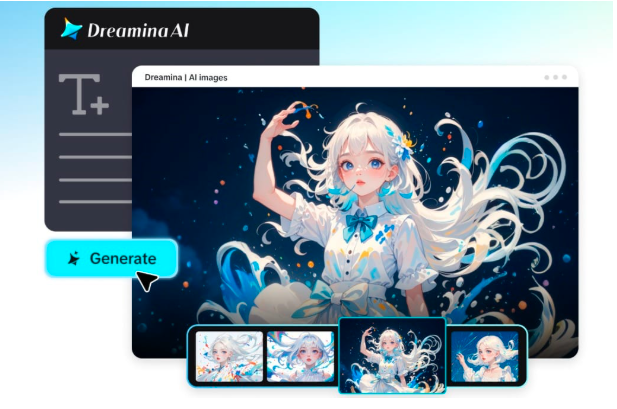
Step 1: Start Dreamina Seedance 2.5
Open Dreamina and choose the Seedance 2.5 AI Video Generator. It allows you to access the official AI model that lets you create high-quality AI videos based on text prompts, pictures, and references.
Step 2: Enter your prompt and references
Describe your scene, its subject, motion, camera style and visual mood in detail. You can upload images or references if you want to affect the character, product, style or the whole video direction.
Sample Prompt: Make a video showing how an old wooden table is transformed into a contemporary home decoration item using a DIY approach. The video should include inspirational pictures, progress shots, fluid camera work, workshop lighting, elegant transitions, textures, and the finished look in a beautifully decorated room.
Step 3: Generate, improve, and save
Click the generate button and watch how Dreamina Seedance 2.5 generates your idea into a cinematic AI video. Improve the outcome through refining the prompt or references and saving the video for use on social media, advertisements, product videos, or other projects.
Inspire others to start creating
Viewers are inspired by DIY videos to begin creating their own projects due to the fact that great results may come from simple things and concepts.
It is important not to chase perfection but rather experiment and show how the idea evolved through small steps of creation.
Project themes worth trying:
- Interior decoration projects
- Handmade gifts
- Furniture refurbishment
- Holiday crafts
- Interesting storage ideas
Each project is an excellent chance to be inspirational and show off your individuality through your unique style and creativity.
Create a portfolio of creative transformations
Each project you complete adds up to your creative experience. With time, your videos may turn into a visual portfolio demonstrating your skills, creative development, and your design style.
No matter whether you create a social media feed, promote your handmade products or just record something for yourself – cinematic storytelling makes your videos look professional.
The more projects you create, the more people recognize your creative vision and expect your future projects. Rather than separate works, your videos become an ongoing story of your imagination and craftsmanship.
Show your creativity with Dreamina
Each DIY project is a testament to one’s imagination, patience, and satisfaction of making something original with their very hands. With Dreamina, you get to tell this story visually in a more engaging way.
Thanks to Seedance 2.5, each photo of your project can be transformed into cinematic stories of the process.