



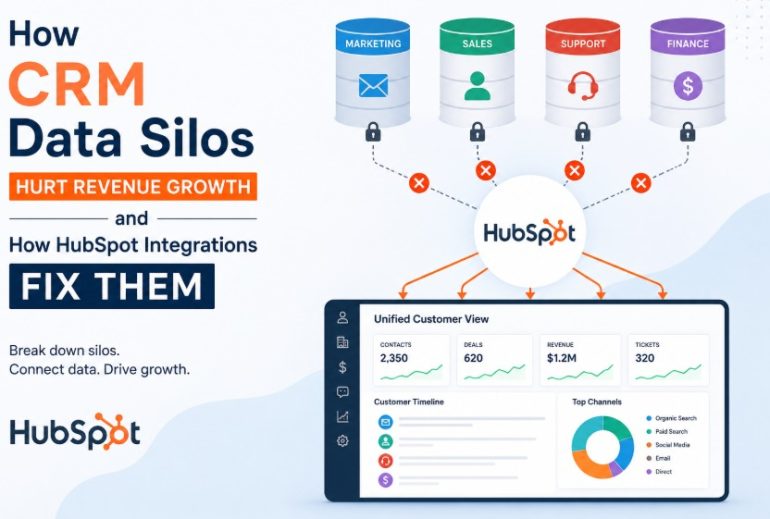
Most growing companies use more than one system to manage customer information. A sales team may use HubSpot to track leads and deals. A marketing team may use forms, email campaigns, and landing pages. A finance team may rely on accounting software. A support team may manage tickets on another platform.
Each system holds important customer data. The problem begins when these systems do not share that data properly.
This creates CRM data silos.
A CRM data silo happens when customer information is stored in separate tools, databases, or spreadsheets without a reliable connection between them. In HubSpot environments, this can lead to missing records, duplicate contacts, weak reporting, inaccurate lead scoring, and poor customer handoffs.
Before a company connects more systems to HubSpot, it often needs to clean and review its CRM structure. This is where hubspot optimization consulting services can support better field planning, lifecycle stage setup, data quality, and reporting structure before larger integration work begins.
This article explains how CRM data silos affect revenue growth and how HubSpot integrations can help fix them through cleaner data flow and better system design.
What Are CRM Data Silos?
CRM data silos are isolated groups of customer data that are not properly shared across business systems.
For example, a marketing team may know which campaign generated a lead. The sales team may know the deal status. The support team may know the customer’s recent issue. The finance team may know whether the customer has paid an invoice.
If this information is not connected, no team has the full customer view.
In a HubSpot setup, data silos often appear when information is spread across:
- HubSpot contact records
- Separate sales tools
- Accounting systems
- E-commerce platforms
- Support ticketing systems
- Internal databases
- Spreadsheets
- Reporting dashboards
Each platform may work correctly on its own, but the business still suffers because the systems are not sharing data in a structured way.
Why CRM Data Silos Happen
CRM data silos usually develop slowly as a business grows.
A company may start with HubSpot for basic contact management. Later, it adds email marketing, payment tools, sales automation, customer support, reporting software, and internal systems. Each new tool solves one problem, but it also creates another place where customer data can live.
If these tools are not connected with proper rules, the business ends up with different versions of the same customer record.
Common causes include:
- No defined system of record
- Poor field mapping
- Manual data entry
- One-way sync limitations
- Duplicate property creation
- Inconsistent naming conventions
- Missing data validation rules
- No regular CRM cleanup process
These issues create confusion across teams and reduce trust in HubSpot reports.
How Data Silos Hurt Revenue Growth
CRM data silos affect revenue because they slow down sales, weaken marketing, and make reporting less reliable.
1. Sales Teams Lose Customer Context
Sales teams need accurate customer data to prioritize leads and close deals.
A salesperson should be able to open a HubSpot contact record and quickly see:
- Lead source
- Form submissions
- Website activity
- Email engagement
- Previous conversations
- Deal history
- Support issues
- Customer status
When this data is missing or stored in another system, sales teams spend extra time searching for information. This slows down follow-up and creates a weaker buying experience.
A lead may have visited pricing pages several times, downloaded a guide, and requested a demo. But if that activity is not connected to the CRM record, the sales team may treat the lead like a cold contact.
That delay can reduce conversion rates.
2. Marketing Attribution Becomes Inaccurate
Marketing attribution depends on connected data.
If HubSpot captures lead source data but revenue is stored in another system, marketers may not know which campaigns actually produced sales.
For example:
A contact enters HubSpot from a paid campaign. The sales team closes the deal in another tool. The payment is recorded in accounting software. If revenue data never returns to HubSpot, the marketing report only shows lead generation, not revenue impact.
This creates poor budget decisions.
The company may reduce spending on a campaign that is actually profitable or increase spending on a campaign that produces leads but not revenue.
3. Lead Scoring Becomes Less Reliable
HubSpot lead scoring works best when customer behavior and profile data are accurate.
Lead scoring may use signals such as:
- Form submissions
- Page views
- Email clicks
- Job title
- Company size
- Industry
- Product interest
- Deal activity
If this information is incomplete because of data silos, the score becomes less useful.
Sales teams may receive leads that are not ready to buy. At the same time, high-intent leads may be missed because their activity is stored in another platform.
This creates friction between sales and marketing teams.
4. Customer Segmentation Breaks
Marketing segmentation depends on clean and complete CRM properties.
HubSpot lists and workflows often rely on fields such as:
- Lifecycle stage
- Industry
- Region
- Product interest
- Customer type
- Renewal date
- Subscription status
If these fields are outdated or disconnected, contacts may enter the wrong lists or receive irrelevant emails.
For example, an existing customer may still be marked as a lead because the sales system did not update HubSpot after the deal closed. That customer may continue receiving sales emails, which creates a poor experience.
5. Revenue Reporting Becomes Unstable
Leadership teams rely on reports to understand pipeline, revenue, and performance.
CRM data silos make reporting difficult because different systems show different numbers.
One dashboard may show 300 leads. Another may show 250. HubSpot may show 40 closed deals, while the finance system shows 35 paid customers.
When teams cannot agree on the numbers, decision-making slows down.
Poor reporting affects:
- Forecasting
- Budget planning
- Sales performance tracking
- Marketing ROI analysis
- Customer retention planning
A business cannot scale confidently if it does not trust its data.
Technical Signs of CRM Data Silos in HubSpot
CRM data silos are not always obvious at first. They usually appear through repeated operational issues.
Common signs include:
- Duplicate contact records
- Missing lifecycle stage updates
- Deals not linked to contacts or companies
- Closed customers still marked as leads
- Manual spreadsheet exports
- Reports that do not match across systems
- Sales and marketing disagreeing on lead quality
- Support teams missing customer history
- Workflows failing because required fields are empty
These symptoms usually point to deeper data structure problems.
How HubSpot Integrations Help Fix Data Silos
HubSpot integrations help reduce data silos by allowing systems to exchange information automatically.
A proper HubSpot integration does more than connect two tools. It defines how data should move, where it should live, and which system should control each field.
1. Centralized Customer Records
HubSpot can act as a central customer record when integrations are planned correctly.
Instead of asking teams to check multiple platforms, HubSpot can display important data from connected systems.
A well-structured contact record may include:
- Marketing activity
- Sales notes
- Deal status
- Support history
- Subscription status
- Payment status
- Product interest
- Customer health indicators
This gives teams a clearer view of the customer journey.
2. Better Field Mapping
Field mapping controls how information moves between HubSpot and another system.
For example:
- “Email” in one system maps to “Email” in HubSpot
- “Account Name” maps to “Company Name”
- “Order Value” maps to “Deal Amount”
- “Subscription Status” maps to “Customer Status”
Good field mapping prevents data from landing in the wrong place.
Poor mapping creates broken records, empty fields, and reporting problems.
3. System of Record Rules
A system of record is the trusted source for a specific type of data.
For example:
- HubSpot may be the system of record for contacts
- An accounting system may be the system of record for payment data
- A support system may be the system of record for tickets
- An ERP may be the system of record for inventory or order status
When these rules are clear, systems do not overwrite each other incorrectly.
This is important because not every field should be edited in every system.
4. Automated Data Sync
Manual data entry is one of the main causes of CRM data silos.
Automation reduces this risk by syncing data between systems based on defined rules.
For example:
- A new customer in billing software updates the HubSpot lifecycle stage
- A support ticket updates customer health status in HubSpot
- A closed deal creates a record in an accounting system
- An e-commerce purchase updates product interest in HubSpot
This reduces manual work and keeps teams aligned.
5. Cleaner Reporting
When systems are connected properly, HubSpot reports become more useful.
Teams can report on:
- Lead source to revenue
- Campaign performance
- Deal conversion rates
- Customer lifecycle movement
- Sales response time
- Customer retention signals
This helps leadership make better decisions based on connected data rather than fragmented reports.
How to Fix CRM Data Silos Before Scaling HubSpot
Fixing CRM data silos requires planning before implementation.
1. Audit Where Customer Data Lives
Start by listing every system that stores customer information.
This may include:
- HubSpot
- Accounting software
- Sales tools
- Support platforms
- E-commerce systems
- Internal databases
- Spreadsheets
The goal is to understand where data is created, edited, and stored.
2. Identify Duplicate and Unused Fields
Many HubSpot portals contain duplicate properties.
For example:
- Customer Type
- Customer Status
- Client Status
- Account Status
If these fields are used by different teams without clear rules, reporting becomes unreliable.
Unused or duplicate fields should be reviewed, merged, archived, or clearly documented.
3. Define Data Ownership
Every important field should have an owner.
For example:
- Marketing owns lead source fields
- Sales owns deal stage fields
- Finance owns payment fields
- Support owns ticket status fields
This reduces confusion and prevents conflicting updates.
4. Plan Integration Logic Before Connecting Tools
Before connecting systems, define:
- Which data should sync
- Which direction it should sync
- How often it should sync
- Which system wins during conflicts
- What happens when a record already exists
- Which fields should never be overwritten
This planning step prevents many future problems.
At this stage, many companies benefit from structured hubspot integration services, especially when HubSpot needs to connect with ERP platforms, accounting tools, customer portals, internal databases, or custom business systems.
5. Monitor Data Quality Over Time
CRM cleanup is not a one-time task.
Businesses should regularly check:
- Duplicate records
- Failed sync events
- Empty required fields
- Workflow errors
- Incorrect lifecycle stages
- Inactive properties
- Broken reports
Regular monitoring keeps HubSpot reliable as the company grows.
When CRM Data Silos Become a Serious Business Risk
CRM data silos become serious when teams stop trusting the system.
Warning signs include:
- Sales teams export leads into spreadsheets
- Marketing cannot connect campaigns to revenue
- Finance and sales report different customer numbers
- Support agents lack customer history
- Leadership questions dashboard accuracy
- Teams rely on manual updates instead of CRM records
At this point, the issue is no longer just a software problem. It is a data operations problem.
HubXpert works with businesses that need cleaner HubSpot architecture, reliable integrations, and stronger CRM data flow. In many HubSpot integration projects, the biggest improvement comes from fixing structure before adding more automation.
Key Takeaways
CRM data silos happen when customer information is trapped in separate systems without reliable synchronization.
These silos hurt revenue growth by weakening sales follow-up, marketing attribution, lead scoring, customer segmentation, and reporting accuracy.
HubSpot integrations can help fix these problems when they are built with clear field mapping, system of record rules, sync logic, and ongoing data monitoring.
A clean CRM structure helps every team work from the same customer view. This leads to faster decisions, better reporting, and more reliable revenue operations.
Final Thoughts
HubSpot can be a strong central system for customer data, but only when it is structured and connected correctly.
As businesses grow, disconnected tools create hidden problems across sales, marketing, support, and finance. These problems often appear as duplicate records, broken reports, missed follow-ups, and inconsistent customer communication.
The best approach is to clean the CRM structure first, define ownership rules, then connect systems with proper integration logic.
When HubSpot data flows correctly across the business, teams can reduce manual work, improve customer visibility, and make better revenue decisions.