


Field teams lose hours every week to broken screens and dead batteries. A dropped tablet on a job site can delay a whole crew. Choosing the right rugged tablet for your business protects your budget and your schedule.
This guide breaks down the factors that actually matter in the field. You will learn what durability ratings mean, how much battery life you need, and which features are worth paying for.
What Makes A Tablet Rugged?
A rugged tablet is built to survive drops, dust, water, and temperature swings that would disable a normal device.
Manufacturers reinforce the frame, seal the ports, and use toughened glass on the screen. Many models carry an IP rating, which generally points to a level of dust and water resistance tested under controlled lab conditions. Some also reference MIL STD testing, which broadly relates to shock and vibration tolerance. Treat these as general indicators rather than guarantees, since real-world conditions vary and testing methods differ between brands.
Key Factors To Check When Choosing a Rugged Tablet
Start by matching the device to your actual work environment, not a generic spec sheet. Think about where the tablet will travel each day. A warehouse tablet faces different risks than one used on a construction site or in a forest. Write down the conditions your team faces most often, then check each candidate device against that list.
Durability Ratings
Look for a stated IP rating and any MIL STD reference, and treat both as general guidance. Ask the seller what conditions the rating was tested under. A tablet rated for splashes is not the same as one rated for full submersion. Confirm the port covers seal tightly, since loose covers are a common failure point in the field.
Battery Life
A full shift without charging is the baseline for any serious field device. Large battery capacity matters more than raw processor speed for most business users. Fast charging also reduces downtime between shifts. Some rugged phone brands have flagship rugged phones that pack a big battery, like the 8849 Tank Pad Ultra, which pairs a large capacity battery up to 23400mAh with rapid charging, which suits crews working long hours away from an outlet.
Key Features for Outdoor Use and Activities
A readable screen and a reliable camera save time on every job. Outdoor teams need a bright, glare-resistant display that stays visible in direct sunlight. Indoor and warehouse teams can often use a standard brightness panel and save on cost. Camera needs also vary widely by role, from simple documentation to detailed inspection work.
Before you compare models, list the tasks your team performs with photos or video each day. That list will tell you which camera features are worth paying for.
- A sunlight-readable display for outdoor jobs
- A high-resolution main camera for documentation
- Low-light or night-capable imaging for dark sites
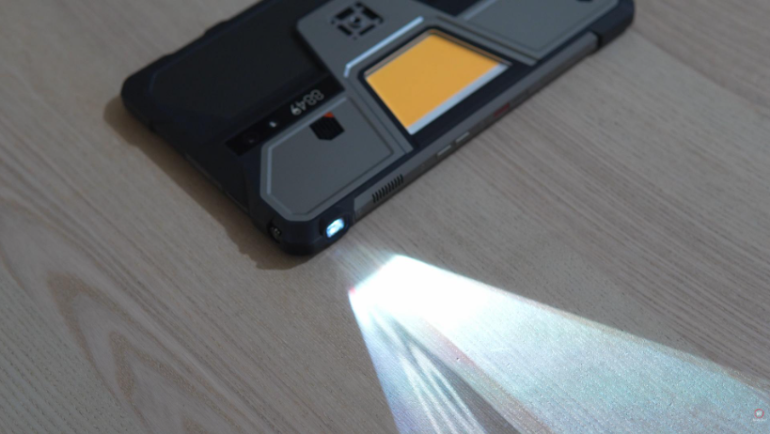
- A built-in projector for on-site presentations
- Extra tools like a rangefinder for measurements
Once you know which items matter, cross them off against each device you shortlist. Skip features your team will never use, since they only add cost without adding value.
How Much Should a Rugged Tablet Cost?
Budget for the full lifespan of the device, not just the sticker price. Cheaper tablets often need replacing sooner, which raises the real cost over time. A slightly higher upfront price can still save money across a three-year deployment.
Ownership Costs
Include repairs, replacement screens, and lost work time when you compare quotes. Ask each vendor about warranty length and what it actually covers. Some warranties exclude water damage even on water-resistant devices, so read the fine print closely.
Rugged Tablet for Your Business
Use this short list before you approve any purchase order. Confirm the durability rating, battery capacity, display type, and software compatibility. Check warranty terms and support response times. Compare the total price against the expected lifespan of the device.
Rugged Tablet vs Standard Tablet: Which Fits Your Team?
A rugged tablet costs more upfront but usually costs less over its full lifespan in tough conditions. Standard tablets work fine for office use or light indoor tasks. Field teams that face drops, dust, or moisture need the extra protection a rugged build provides.
| Factor | Rugged Tablet | Standard Tablet |
|---|---|---|
| Drop resistance | Built for frequent impacts | Prone to cracked screens |
| Water and dust protection | Sealed ports and casing | Little to no protection |
| Battery life | Often built for full shifts | Varies, usually shorter |
| Upfront cost | Higher | Lower |
| Best fit | Field, warehouse, industrial | Office, light indoor use |
Use this table as a starting point, not a final answer. Weigh each row against your specific work environment before you decide.
Common Mistakes When Choosing a Rugged Tablet
Rushed purchases often lead to devices that do not match real field conditions. Avoiding a few common errors saves both money and downtime later. Review this list before you finalize any order.
- Buying based on price alone without checking durability ratings
- Ignoring battery capacity for teams working long shifts
- Skipping a software compatibility check with existing business tools
- Overlooking warranty terms that exclude common failure causes
- Choosing extra features the team will never actually use
Share this list with whoever approves the purchase. A short review now prevents a costly replacement later.
Conclusion
Choosing the right rugged tablet for your business comes down to matching real conditions to real specs. Check durability ratings, battery capacity, display quality, and software fit before you commit. Compare total ownership cost, not just the purchase price. Avoid common mistakes like buying on price alone or ignoring warranty terms.
A device that fits your actual field work will pay for itself through fewer replacements and less downtime. Use the checklist and comparison table in this guide as your starting point. Take the time to test a shortlist of devices with your own team before placing a large order. That small extra step protects your budget for years to come.