



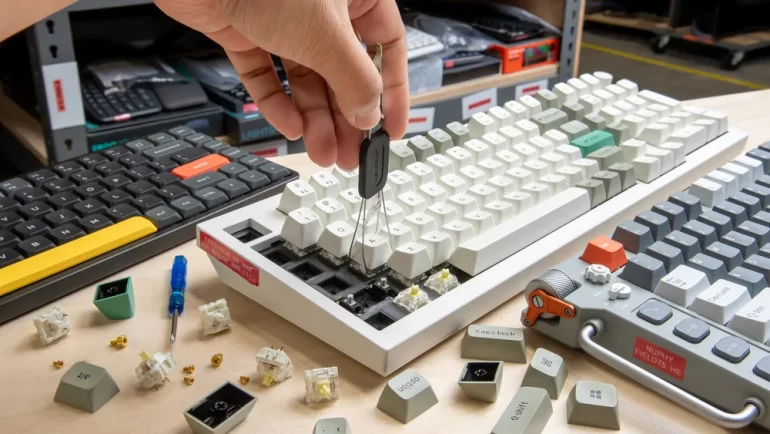
Building a mechanical keyboard can be as simple or as involved as you want it to be. Instead of buying a keyboard that has already been assembled, a mechanical keyboard kit lets you choose important parts such as the case, PCB, plate, switches, stabilizers, and keycaps. Depending on the kit, you may only need to install switches and keycaps, or you may need to assemble most of the keyboard yourself.
For beginners, however, the number of choices can quickly become confusing. A 60% keyboard saves desk space, while a 75% layout keeps the function row. A hot-swappable PCB makes switch changes easier, while a soldered PCB can provide a different type of building experience. Materials, mounting systems, wireless connectivity, firmware, and compatibility can also affect the final result.
This guide explains what to look for when choosing a mechanical keyboard kit, whether you are building your first custom keyboard, upgrading your workstation, or creating a keyboard specifically for gaming and everyday productivity.
What Should You Consider Before Buying a Mechanical Keyboard Kit?
Before comparing individual kits, start with how you actually use your keyboard. Your preferred layout, available desk space, typing habits, and willingness to assemble the keyboard can narrow the choices considerably.
For example, a programmer who frequently uses function keys may prefer a 75% or TKL keyboard, while someone who wants maximum mouse space for competitive gaming may prefer a 60% or 65% layout.
Your workstation also matters. The U.S. Occupational Safety and Health Administration (OSHA) recommends positioning a keyboard so the wrists can remain relatively straight and the elbows stay close to the body. This does not mean one keyboard size is automatically more ergonomic than another, but it is a useful reminder that keyboard dimensions should work with your desk and posture.
What Keyboard Layout Should You Choose?
Keyboard layout determines which keys you get and how much desk space the keyboard occupies.
60% keyboards remove the dedicated function row, navigation cluster, and number pad. They are compact and leave more room for a mouse, but users often access missing keys through function layers.
65% keyboards add dedicated arrow keys and usually a small navigation cluster while remaining relatively compact.
75% keyboards keep the function row while compressing the navigation keys. They are often a practical compromise for people who want a smaller keyboard without giving up frequently used keys.
TKL (80%) keyboards retain the function row and navigation keys but remove the number pad. They can work well for office users, programmers, and gamers who rarely use a numeric keypad.
What Size Mechanical Keyboard Is Right for You?
Think about the keys you use rather than choosing a size based only on appearance.
If your desk is small or you mainly use keyboard shortcuts, a 60% or 65% kit may make sense. If you regularly use F-keys, arrow keys, and navigation controls, 75% or TKL is usually more convenient.
For accounting, spreadsheet work, or data entry, a full-size or 1800-style layout with a number pad may be worth the additional space.
Which Mechanical Keyboard Kit Components Matter Most?
A mechanical keyboard kit is more than a case and PCB. Each component contributes to the final typing experience.
| Component | What It Affects | What Beginners Should Look For |
|---|---|---|
| PCB | Connectivity, layout, switches, firmware | Hot-swap and good firmware support |
| Plate | Flex, sound, switch stability | Aluminum, FR4, PC, or other compatible materials |
| Case | Weight, rigidity, acoustics | Solid construction and good fit |
| Mounting style | Flex and typing feel | Choose based on desired feel rather than trend |
| Switches | Actuation, sound, resistance | Linear, tactile, or clicky based on preference |
| Keycaps | Texture, sound, appearance | Correct layout compatibility |
| Stabilizers | Large-key consistency | Reliable, properly sized stabilizers |
The most important point is compatibility. A premium case cannot compensate for a PCB that does not fit it, and attractive keycaps are useless if their sizes do not match the keyboard layout.
How Should You Choose the PCB and Mounting Style?
The PCB is effectively the electronic foundation of the keyboard. It determines the supported layout, switch type, connectivity, firmware options, and often whether the keyboard supports features such as RGB or wireless operation.
For a first build, a hot-swappable PCB can be particularly convenient because you can install compatible switches without soldering. It also makes experimenting with different switches easier.
Mounting style affects how the PCB and plate are supported inside the case. Common approaches include tray mount, gasket mount, top mount, and other variations. Rather than assuming one mounting style is universally better, consider whether you prefer a firmer typing experience or more noticeable flex.
Which Case and Plate Materials Should You Consider?
Case materials can influence weight, rigidity, sound, and overall feel.
Aluminum cases are popular in custom keyboards because they can provide a substantial, solid feel. Plastic cases can be lighter and may produce a different acoustic character. Wood cases offer a distinctive appearance and sound profile.
The plate also matters. Aluminum can feel relatively firm, while materials such as polycarbonate or FR4 may provide a different balance of stiffness and flex. The best choice depends on the combination of case, mounting method, switches, and personal preference.
How Do Switches and Keycaps Affect Typing Feel?
Switches have a direct effect on how a keyboard feels when you press a key.
Linear switches provide a smooth keypress without a tactile bump and are commonly chosen by gamers and users who prefer a consistent motion.
Tactile switches provide a noticeable bump during the keypress and can appeal to typists who want physical feedback.
Clicky switches add an audible click in addition to tactile feedback. They can be enjoyable in a private environment but may not be suitable for shared offices.
Keycaps affect the texture, sound, appearance, and sometimes perceived smoothness of typing. PBT keycaps are often valued for their textured feel and resistance to developing a glossy surface, while ABS keycaps can offer different textures, colors, and manufacturing options.
The important thing is not to choose switches or keycaps solely because they are popular. Your preferred typing force and sound environment matter more.
What Features Should You Look for in a Mechanical Keyboard Kit?
Once you understand the basic components, look at the features that determine how easy the keyboard will be to customize and use.
A good mechanical keyboard kit should ideally have clear compatibility information, reliable documentation, accessible replacement parts, and firmware that is easy to configure.
This becomes especially important if you plan to keep the keyboard for several years. A kit that is easy to repair and customize can potentially be more useful than one with impressive specifications but limited software or replacement support.
Is a Hot-Swappable PCB Worth It?
For many beginners, yes.
A hot-swappable PCB allows compatible switches to be installed or replaced without soldering. This is useful if you are still experimenting with linear, tactile, or silent switches.
It can also make maintenance easier. If one switch eventually develops a problem, you may be able to replace it without disassembling the entire PCB and using a soldering iron.
However, always check the specific socket and switch compatibility before purchasing. Hot-swap does not mean that every mechanical switch is automatically compatible with every PCB.
Do You Need Wireless Connectivity and RGB Lighting?
Wireless connectivity is useful if you regularly move the keyboard between a desktop, laptop, or other devices. For a permanent desktop setup, wired USB may be simpler and more predictable.
RGB lighting is primarily a preference rather than a requirement. It can be useful for aesthetics, low-light visibility, or creating a particular desk setup, but it should not be the deciding factor if other components are significantly more important to you.
Battery capacity, wireless protocol, operating-system support, and charging method are worth checking when wireless functionality is important.
Why Does Software and Firmware Support Matter?
Firmware determines how the keyboard behaves beyond basic typing.
QMK, for example, is an open-source keyboard firmware project that supports programmable keymaps, layers, macros, and other customization features. Its official documentation explains both graphical configuration options and more advanced firmware development.
For a beginner, you do not necessarily need to learn programming. However, choosing a kit with well-documented firmware can make future customization much easier.
How Much Should You Spend on a Mechanical Keyboard Kit?
There is no single price that defines a good custom keyboard. The total cost depends on whether the kit includes only the keyboard case and PCB or also includes plates, stabilizers, switches, keycaps, and other accessories.
Remember that the advertised kit price may not represent the final cost of the completed keyboard. You may also need switches, keycaps, stabilizers, a USB cable, foam, tools, or other components.
For this reason, calculate the cost of the complete build before deciding which kit fits your budget.
What Can You Expect at Different Price Levels?
At the lower end, entry-level kits can provide a relatively inexpensive way to learn the basics of custom keyboards. They may use simpler cases, mounting systems, or PCBs, but that does not necessarily make them unsuitable for a first build.
Mid-range kits often provide a wider selection of materials, better construction, more flexible mounting options, and features such as hot-swapping or wireless connectivity.
Higher-priced kits may focus more heavily on machining quality, case design, acoustics, finishing, proprietary mounting systems, or premium materials.
A useful approach is to spend more on the features you will actually notice. If you are primarily interested in typing feel, switches and stabilizers may deserve more attention than decorative features.
Is an Expensive Keyboard Kit Always Better?
Not necessarily.
Price can reflect materials, manufacturing complexity, design, quality control, brand reputation, or limited production. But a more expensive kit may not improve your experience if its layout or features do not match your needs.
Community discussions show a similar pattern. In a 2024 KeebTalk discussion about entry-level custom keyboard kits, users recommended different options depending on whether the buyer wanted a simpler hot-swap board or a more hands-on custom build. One contributor specifically described pre-built hot-swap keyboards as easier for first-time users, while more traditional custom kits require more assembly.
That is a useful distinction: the best mechanical keyboard kit is often the one that matches your experience level and intended use, not simply the one with the highest price.
Conclusion
Choosing a mechanical keyboard kit becomes much easier when you stop looking at specifications individually and instead consider the complete build.
Start with the layout. Decide whether you need a number pad, function row, dedicated arrows, or maximum desk space. Then evaluate the PCB, mounting style, case, plate, switches, stabilizers, and keycaps as one system.
For beginners, a hot-swappable PCB, widely supported layout, clear documentation, and readily available replacement parts can reduce unnecessary complexity. More experienced builders may want to explore different mounting systems, materials, firmware configurations, and acoustic tuning.
If you are ready to compare different options, you can explore a selection of mechanical keyboard kit options and use the checklist above to compare layouts, components, and features before making a decision.
Ultimately, building a custom keyboard is less about finding a universally “best” configuration and more about creating a keyboard that fits the way you type, work, play, and use your desk.
FAQs
What is the best mechanical keyboard kit for beginners?
A beginner-friendly mechanical keyboard kit usually has a common layout, hot-swappable PCB, straightforward assembly, clear documentation, and good firmware support. A 65%, 75%, or TKL kit can be a practical starting point because these layouts retain commonly used keys without taking up as much space as a full-size keyboard.
If you are completely new to keyboard building, a kit that requires little or no soldering can reduce the learning curve.
What is the most important part of a mechanical keyboard kit?
There is no single component that determines everything. The PCB establishes compatibility and functionality, while the switches strongly influence key feel. The mounting system, plate, case, and stabilizers also affect the overall typing and sound experience.
For most beginners, compatibility between these components should be a higher priority than choosing a premium material or decorative feature.
How do I know if a keyboard kit is compatible with my switches and keycaps?
Check three things before buying: switch compatibility, keycap compatibility, and layout compatibility.
For switches, check whether the PCB supports the switch type and whether it uses compatible hot-swap sockets. For keycaps, verify the stem type and the required key sizes, especially for the spacebar, Shift, Enter, Backspace, and bottom-row keys.
Finally, make sure the keycap set supports your specific layout. A keycap set designed for a standard 60% board may not include all the sizes required by a 75% or TKL keyboard.
When in doubt, check the kit’s compatibility guide or product specifications before ordering individual components.