



The FIFA World Cup 2026 will be the largest edition of the tournament so far, with 48 national teams, 104 matches and host cities across the United States, Canada and Mexico. For UK viewers, free-to-air TV remains the main official route, while IPTV can also be used as a flexible way to follow live football on Firestick, Smart TV, Android TV, mobile and tablet.
World Cup 2026 IPTV viewing guide for UK football fans.
World Cup 2026 Key Facts
World Cup 2026 is scheduled to run from June 11 to July 19, 2026. The new expanded format means more teams, more matches and more viewing hours than previous tournaments. Because the tournament is hosted in North America, UK viewers should also prepare for a mix of evening and late-night kick-off times.
The event will be hosted across three countries for the first time: the United States, Canada and Mexico. Matches will take place in 16 host cities, with the final scheduled for New York/New Jersey. This wider format makes preparation important for viewers who want to follow the full tournament from the group stage to the final.
| Detail | World Cup 2026 Information |
| Tournament Dates | June 11 to July 19, 2026 |
| Total Teams | 48 national teams |
| Total Matches | 104 matches |
| Host Countries | United States, Canada and Mexico |
| Host Cities | 16 cities across North America |
| Best Preparation | Test TV apps, IPTV app, device speed, EPG guide and backup streams before the opening match |
Where UK Viewers Can Watch World Cup 2026
UK viewers will be able to watch World Cup 2026 through free-to-air coverage from BBC and ITV. This makes BBC channels, ITV channels, BBC iPlayer and ITVX the most important official viewing options for the tournament. For many viewers, this will be enough to watch the major matches without paying for a separate sports package.
However, free streaming platforms can become very busy during peak games. England matches, knockout rounds, semi-finals and the final usually create the highest demand. When millions of viewers connect at the same time, some people may experience stream delay, temporary errors, app crashes or lower picture quality.
IPTV is often used by football fans as an additional viewing route. A strong IPTV setup can help viewers access live sports channels, international feeds, EPG schedules, HD streams, 4K-ready channels and backup sources. The key is to test everything before match day instead of waiting until the first whistle.
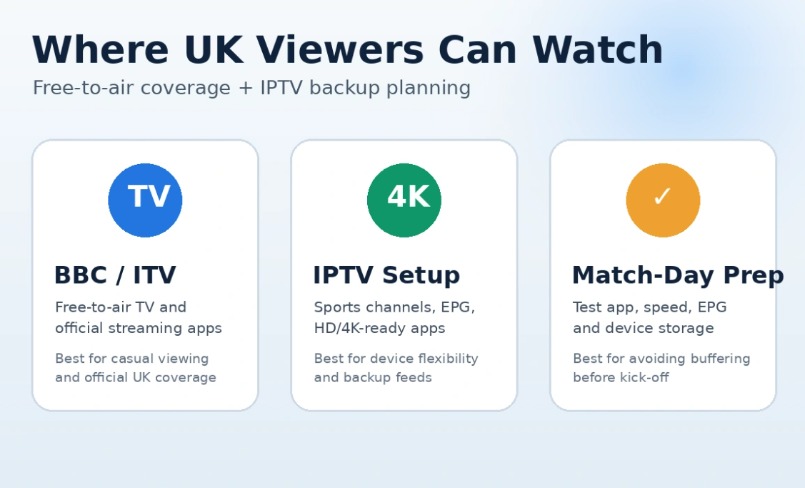
UK viewers can combine official free-to-air coverage with a tested IPTV setup for flexibility.
| Viewing Route | Best For | Possible Limitation |
| BBC / ITV TV Channels | Official free-to-air match coverage | Limited to scheduled UK broadcast split |
| BBC iPlayer / ITVX | Streaming on mobile, web and smart devices | Can become busy during high-demand fixtures |
| IPTV App | Device flexibility, backup feeds, EPG guide and HD/4K options | Quality depends on provider, app, device and internet stability |
| Firestick or Android TV Box | Stable IPTV setup for live sports | Needs correct app setup and enough device storage |
Why IPTV Is Useful During World Cup 2026
IPTV is useful because it gives football fans more control over where and how they watch. One viewer may prefer the living room TV, another may follow a match on a phone, and someone else may use a tablet or laptop. A good IPTV setup can support this kind of multi-device viewing when the provider and subscription allow it.
It is also useful during tournaments because backup feeds matter. If one stream becomes unstable during a high-demand match, switching to another feed can save time. This is especially important for knockout games, extra time and penalty shootouts, where even a short freeze can ruin the experience.
IPTV should not be treated as only a playlist. It is a complete setup that includes the provider, app, device, internet connection, router, EPG guide and support response. When one part is weak, the whole match-day experience can suffer.
Recommended IPTV Setup for UK Football Fans
UK viewers who want a reliable World Cup setup should look for HD and 4K stream quality, UK sports channels, EPG support, backup streams, fast activation and compatibility with Firestick, Android TV and Smart TV. It is also important to test the IPTV service during a live football match, because testing during quiet hours does not prove match-day stability.
One IPTV option UK viewers can test before the tournament is Best Iptv Uk. The best way to evaluate any IPTV service is to install it on your main device, load the EPG, favourite the main football channels and test it during a live sports event before committing for World Cup 2026.
| Feature to Check | Why It Matters for World Cup 2026 |
| HD and 4K Streams | Improves picture quality on large TVs, especially for live football |
| Backup Channels | Gives another option if one feed freezes during a big match |
| EPG Support | Makes it easier to find matches, channels and kick-off times |
| Firestick Compatibility | Firestick is one of the most common IPTV devices in the UK |
| Fast Support | Important when a playlist, channel or login needs refreshing |
Best Devices for IPTV World Cup Streaming
The device you use can be just as important as the IPTV provider. Older Smart TVs may run slowly, crash during long matches or fail to refresh playlists properly. A dedicated streaming device is usually more stable for live sports.
Firestick 4K Max is a popular option because it is affordable, easy to set up and works with IPTV apps such as TiviMate and IPTV Smarters. Android TV boxes and NVIDIA Shield are also strong options for users who want more power, smoother navigation and better long-term performance.
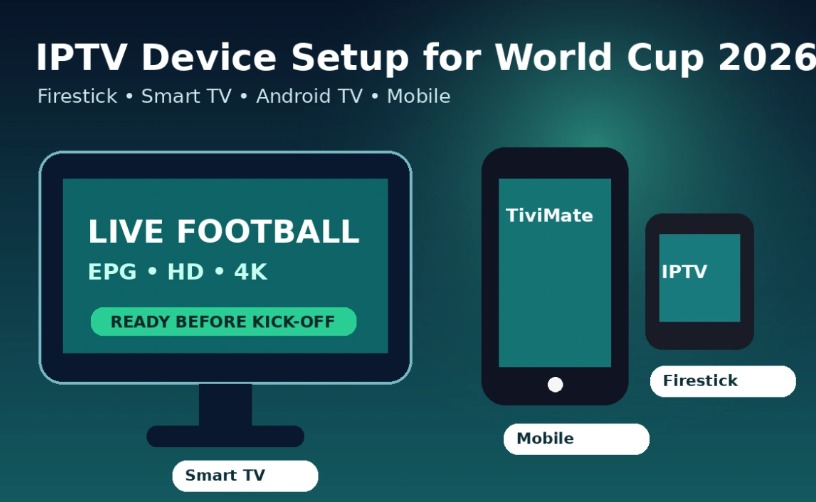
Firestick, Android TV, Smart TV and mobile devices can all be used for IPTV live football.
| Device | IPTV Performance | Best Use Case |
| Firestick 4K Max | Very good for live IPTV and 4K apps | Most UK homes that want a simple IPTV setup |
| NVIDIA Shield | Excellent performance and strong processing power | Heavy IPTV users and 4K sports fans |
| Android TV Box | Good if the box has enough RAM and storage | Users who want app flexibility |
| Modern Smart TV | Can work well, but depends on the TV model | Users who do not want an external device |
| Mobile or Tablet | Good for secondary viewing | Watching away from the main TV |
How to Set Up IPTV on Firestick for World Cup 2026
Firestick is one of the easiest devices for IPTV because it supports popular IPTV players and is simple to connect to a TV. The exact setup depends on the provider and app, but the basic process is similar for most IPTV services.
- Open Firestick settings and allow installation from unknown sources if the IPTV app requires sideloading.
- Download the Downloader app from the Amazon App Store.
- Install an IPTV app such as TiviMate or IPTV Smarters.
- Open the IPTV app and choose Add Playlist, Add User or Xtream Codes login.
- Enter the M3U URL or Xtream Codes details provided by the IPTV service.
- Wait for channels and categories to load fully.
- Open EPG settings and refresh the guide URL.
- Favourite the main football and sports channels before the tournament begins.
After setup, test a live sports stream for at least 20 to 30 minutes. Do not only check whether the channel opens. Check picture quality, audio sync, buffering, channel switching, EPG loading and whether the app stays stable.
Internet Speed Needed for IPTV Live Football
For IPTV, high download speed is helpful, but stability is even more important. A speed test can show 100 Mbps while the stream still buffers if the router has interference, the Wi-Fi signal is weak or jitter is high. Live sports need consistent data flow because the action is happening in real time.
For HD streams, 10 to 20 Mbps can be enough on one device. For 4K IPTV, 30 to 50 Mbps is safer. If several people are streaming, gaming or using video calls at the same time, aim for more bandwidth and use Ethernet where possible.
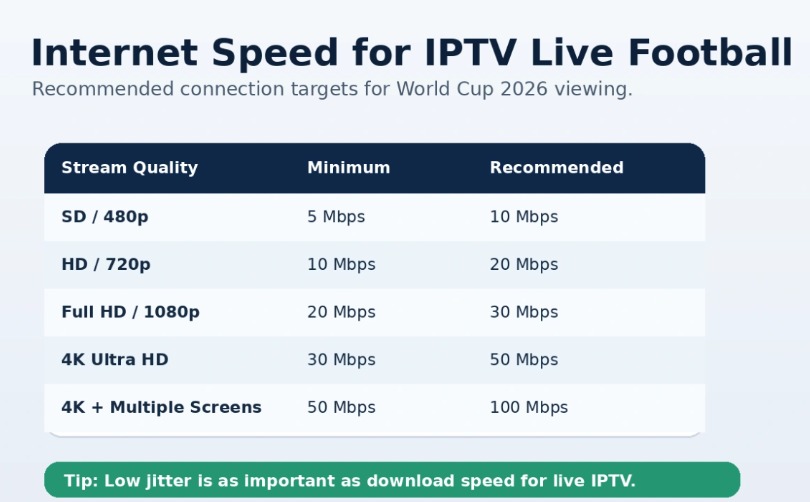
Speed matters, but low jitter and stable routing are essential for live IPTV football.
| Stream Quality | Minimum Speed | Recommended Speed |
| SD 480p | 5 Mbps | 10 Mbps |
| HD 720p | 10 Mbps | 20 Mbps |
| Full HD 1080p | 20 Mbps | 30 Mbps |
| 4K Ultra HD | 30 Mbps | 50 Mbps |
| 4K on Multiple Screens | 50 Mbps | 100 Mbps |
Common IPTV Problems During World Cup Matches
Most IPTV problems happen during peak viewing moments. The opening match, England games, knockout rounds, semi-finals and the final will create the highest demand. Preparing early gives viewers time to fix weak points before the tournament begins.
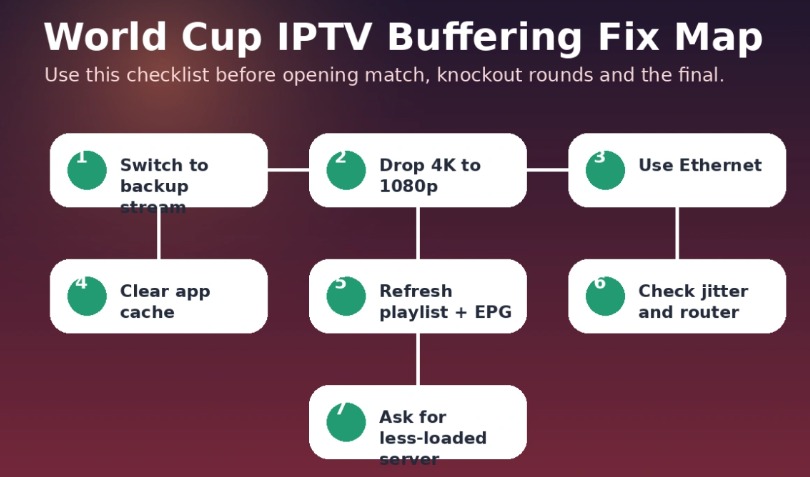
Use this fix map before high-demand matches to reduce IPTV buffering risk.
| Problem | Likely Cause | Fast Fix |
| Buffering or freezing | Server overload, weak Wi-Fi or high jitter | Switch stream, use Ethernet, reduce quality to 1080p |
| App crashing on Firestick | Low storage, full cache or outdated app | Clear cache, force-stop app, restart Firestick |
| Black screen | Expired channel source or playlist issue | Refresh playlist and try a backup channel |
| EPG not showing matches | Outdated EPG URL or wrong timezone | Set timezone to UK/London and refresh EPG |
| Works on phone but not TV | Weak Smart TV app or low TV memory | Use Firestick or Android TV box instead |
| Audio out of sync | Encoding delay, Bluetooth delay or app buffering | Restart stream, change audio track or disable Bluetooth |
| Fast internet but still buffering | High jitter, ISP routing or overloaded IPTV server | Test VPN, restart router or request another server |
IPTV Buffering and Freezing
Buffering is the most common live football issue. It can be caused by overloaded servers, weak Wi-Fi, high network jitter, old apps or too many users on the same feed. If buffering starts during a major match, switch to a backup stream first instead of changing every setting at once.
If the issue continues, reduce the stream from 4K to 1080p, restart the app, clear cache and move closer to the router. For the most stable connection, use Ethernet instead of Wi-Fi.
Firestick App Crashing
Firestick apps may crash when the device has low storage or when cache builds up over time. This is more common on older Firestick models during long live matches.
Clear cache, remove unused apps, restart the device and keep the IPTV app updated. If you watch live sports often, a Firestick 4K Max or Android TV box is usually a better option.
EPG Not Showing the World Cup Schedule
An EPG problem can make it hard to find the right channel at the right time. This usually happens because the guide URL is outdated, the app has not refreshed or the timezone is wrong.
Set the timezone to UK/London, refresh the EPG and save the main sports channels as favourites. This reduces the risk of searching through a long playlist right before kick-off.
World Cup IPTV Match-Day Checklist
A strong match-day checklist can prevent most problems. The goal is to make sure your device, app, connection and playlist are ready before the game starts.
| When to Check | Action | Why It Matters |
| 7 days before | Install IPTV app and test login | Gives time to fix setup problems |
| 5 days before | Test during a live football match | Shows real match-day performance |
| 3 days before | Refresh playlist and EPG | Prevents missing or outdated channels |
| 1 day before | Clear cache and restart device | Improves app stability |
| 1 hour before | Open the stream and check audio sync | Leaves time to switch feed if needed |
| During match | Use backup stream if buffering starts | Fastest way to recover without missing action |
Another IPTV Option for Multi-Device Viewing
Some viewers want IPTV on more than one device because World Cup 2026 will include many fixtures across different times. Multi-device flexibility can be useful when one person watches on the main TV, another uses a phone and someone else follows a match on a tablet or laptop.
For users who want another option to compare, varodatic can be checked for IPTV access and live sports setup across different devices. As with any IPTV service, the smart approach is to test it before the tournament starts and confirm that the main viewing device works smoothly.
Legal and Safe Viewing Tips
UK viewers should always use legal and licensed viewing options. BBC and ITV provide the official free-to-air route for UK audiences, and that should be the first option for viewers who want guaranteed legitimate coverage.
If using IPTV as a flexible viewing method, choose carefully. Avoid suspicious apps, do not install unknown files from random sources and test everything on a secure home network. A VPN may help with privacy or routing issues, but it should be tested before match day because some VPN servers can also reduce speed.
FAQ — World Cup 2026 IPTV UK
Can I watch World Cup 2026 free in the UK?
Yes. UK viewers will have free-to-air World Cup coverage through BBC and ITV. Matches will be shown on TV and through official streaming platforms depending on the match schedule.
Is IPTV useful for World Cup 2026?
IPTV can be useful for device flexibility, backup streams, EPG guides and HD or 4K viewing. The quality depends on the provider, app, device and internet connection.
What is the best IPTV app for Firestick?
TiviMate is popular with experienced IPTV users because it has strong EPG and live TV features. IPTV Smarters is also common because it is simple and beginner-friendly.
Why does IPTV buffer during live football?
IPTV buffers when servers are overloaded, Wi-Fi is weak, jitter is high, the app is outdated or the device does not have enough memory. Testing during a real live sports event is the best way to find problems early.
Do I need 4K for World Cup 2026?
4K is not required, but it can improve the viewing experience on a large TV. For stable 4K, use a strong device, enough speed and preferably Ethernet.
Should I use a VPN with IPTV?
A VPN is not always required. Some users test it for privacy or ISP routing issues, but it should be checked before match day to make sure it does not slow the stream.
Final Thoughts
World Cup 2026 will bring huge demand for live football streams, especially during UK viewing hours and knockout fixtures. Viewers who prepare early will have a better experience than those who wait until the first match to test their setup.
The best plan is simple: use official free-to-air coverage when available, test IPTV before the tournament, choose a strong device, refresh the EPG and keep backup streams ready. With the right preparation, UK viewers can follow the tournament without missing goals, extra time or penalties.