



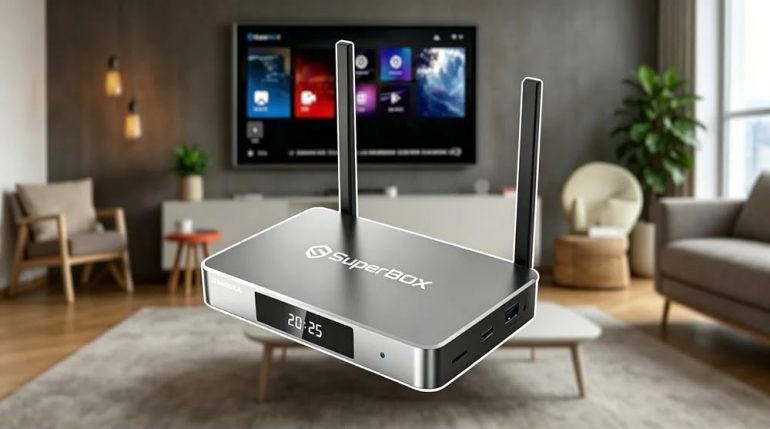
An aging television does not always mean the entire entertainment setup needs to be replaced. In many homes, the screen still produces a good picture, has the right size, and works perfectly with external devices. The real limitation may simply be the older software or connected features built into the TV.
This creates an interesting upgrade decision. Consumers can purchase a new Smart TV and replace the complete system, or they can keep their existing screen and add an Android TV box. Both options can introduce modern connected features, but they approach the upgrade from very different directions.
Once an external upgrade becomes the preferred route, the next step is selecting hardware that fits the existing television and network. Different households may have different priorities, from storage and connectivity to high-resolution video support and everyday navigation. Comparing SuperBox models allows consumers to examine those differences before choosing a configuration.
The Smart TV Route Replaces Everything Together
A new Smart TV offers an integrated approach to upgrading. The screen, processor, operating system, networking hardware, applications, speakers, and other connected functions are built into one product. For someone whose television itself is outdated, this can be an efficient way to refresh the entire entertainment system in one purchase.
There is also a convenience advantage to having everything integrated. The user does not need to position a separate box or manage an additional HDMI connection. However, this approach also means paying for a completely new display, even when the current screen is still perfectly suitable. Consumers should therefore consider whether they actually need a new panel before choosing this route.
An Android TV Box Takes a More Targeted Approach
An Android TV box separates the connected experience from the television screen. It uses its own processor, storage, operating system, networking hardware, and ports while connecting to the existing TV through HDMI. This makes it possible to modernize certain aspects of a setup without replacing the display.
That separation can be valuable when the television is still a strong part of the entertainment system. Instead of paying for another screen, consumers can concentrate their budget on processing performance, connectivity, storage, and software capabilities. The approach also creates a modular setup in which the external device can potentially be replaced independently in the future.
Compare the Upgrade by Looking at Total Value
A new Smart TV may appear to provide more because it combines multiple components in one product. However, consumers should consider how much of that package they will actually use. If the existing screen already meets their expectations, spending money on another display may provide less practical value than improving the connected hardware.
An Android TV box can make the upgrade more focused. The television remains where it is, while the external device handles the newer connected functions. This does not automatically make a TV box the cheaper or better solution in every situation, but it can be a sensible alternative when the primary problem is the television’s smart functionality rather than its display quality.
Performance Can Change the Everyday Experience
Connected entertainment devices need enough processing capability to handle their operating system, applications, menus, and other functions smoothly. A television with aging internal hardware may become frustrating when applications take longer to open or navigation feels less responsive. An external device provides a separate computing platform with its own hardware specifications.
Consumers should look at the complete hardware combination rather than focusing on processor speed alone. RAM, graphics capability, storage, operating system, and connectivity all contribute to the experience. The right Android TV box is therefore not necessarily the one with the most impressive specification, but the one whose overall hardware matches the household’s actual requirements.
Storage Becomes Important as Usage Expands
Storage can be easy to overlook when choosing a connected TV device. At first, a user may install only a few applications and have plenty of available space. Over time, however, additional applications, system data, updates, and other supported functions can increase storage requirements. Having additional capacity can provide more flexibility as usage grows.
This is particularly relevant for consumers planning to keep their external device for several years. A higher-capacity model can reduce the likelihood of storage becoming a limitation later. However, buyers should still match capacity to realistic usage rather than assuming that the largest available option is automatically necessary for every household.
High Storage Can Make a Targeted Upgrade More Flexible
Storage becomes particularly interesting for households that expect their connected TV setup to grow. A higher-capacity device can provide additional room for applications and supported functions while reducing the need to constantly manage available space. This can be useful when an external device is intended to remain part of the entertainment system for an extended period.
The SuperBox S7 Ultra is one example of a higher-storage Android TV box, offering 128GB of storage alongside 4GB of DDR RAM and Android 12. It also includes Wi-Fi 6 support, Gigabit Ethernet, Bluetooth 5.2, USB 3.0, and H.265 6K@60fps video decoding. These specifications make it worth considering for users who want a connected upgrade with additional storage and modern connectivity, while the actual benefit will depend on the television, network, applications, and content being used.
Network Quality Still Sits Behind the Hardware
An upgraded device cannot overcome every network limitation. Wi-Fi interference, router distance, network congestion, and inconsistent internet service can all affect connected entertainment. Before purchasing new hardware, consumers should therefore consider whether their existing network can provide the conditions needed for the viewing experience they want.
The advantage of an external device is that some models provide both wireless and wired connectivity options. Wi-Fi can make installation easier in rooms where running a cable is inconvenient, while Ethernet can provide a direct connection when the router is nearby. Choosing between these options should be based on the home’s layout rather than assuming one connection method will work equally well everywhere.
Resolution Should Be Matched Across the System
Higher-resolution support can make an Android TV box more attractive, but the capability needs to be considered alongside the television. An external device may support high-resolution video decoding, while an older screen may have a lower native resolution. In that situation, the box can still provide connected functionality, but the television remains the limiting component for image output.
This is why resolution should be treated as part of the complete upgrade rather than as an isolated specification. If the existing display already provides the desired picture quality, an external device can focus on improving connectivity and smart functions. If the display itself is no longer satisfactory, replacing the entire television may deliver a more noticeable improvement.
Decide Whether You Prefer Integration or Flexibility
A Smart TV is naturally attractive to consumers who want everything contained within one product. There are fewer external components, fewer cables, and no separate device to position. For someone already planning to replace the television, an integrated Smart TV can be a straightforward solution.
An Android TV box takes the opposite approach by separating the screen from the connected platform. This creates a more modular system in which the display and smart hardware can be considered independently. Consumers who prefer upgrading individual components over time may appreciate this flexibility, especially when their existing television remains in good physical condition.
Remote Control Design Can Affect Daily Convenience
The remote is often the part of an entertainment system that users interact with most frequently. Opening applications, navigating menus, searching for content, and adjusting settings all depend on simple and responsive controls. A technically capable device can still feel inconvenient if everyday navigation is unnecessarily complicated.
Voice functionality can further change how users interact with connected hardware. Instead of entering every search through an on-screen keyboard, users may have the option to use voice commands for supported functions. These features are most valuable when they genuinely simplify common tasks, so consumers should consider usability alongside specifications when comparing devices.
Final Thoughts
A television does not automatically become obsolete simply because its built-in smart features have aged. When the display remains capable, an Android TV box can provide a practical route toward newer connected functionality without requiring the entire television to be replaced. This makes the upgrade process more targeted and potentially more flexible.
A new Smart TV still makes sense when the display itself needs improvement or when an all-in-one setup is the priority. Consumers should therefore compare their actual needs across screen quality, performance, storage, connectivity, software, and future usage. By identifying what truly needs upgrading, they can choose between a Smart TV and an Android TV box with greater confidence.