


Online job interviews have become a normal part of the hiring process. Many employers now use video interviews to screen candidates, meet applicants from different locations, and speed up recruitment. For job seekers, this creates both an opportunity and a challenge.
The opportunity is that you can interview for roles without traveling, saving time and reaching more employers. The challenge is that online interviews require a different type of preparation. It is not enough to have a good resume and strong experience. You also need to manage your camera, sound, lighting, internet connection, background, body language, and communication style.
A successful online interview depends on preparation. Recruiters want to see that you are professional, confident, organized, and ready for the role. When your technology works smoothly and your answers are clear, you can focus on showing your value instead of worrying about distractions.
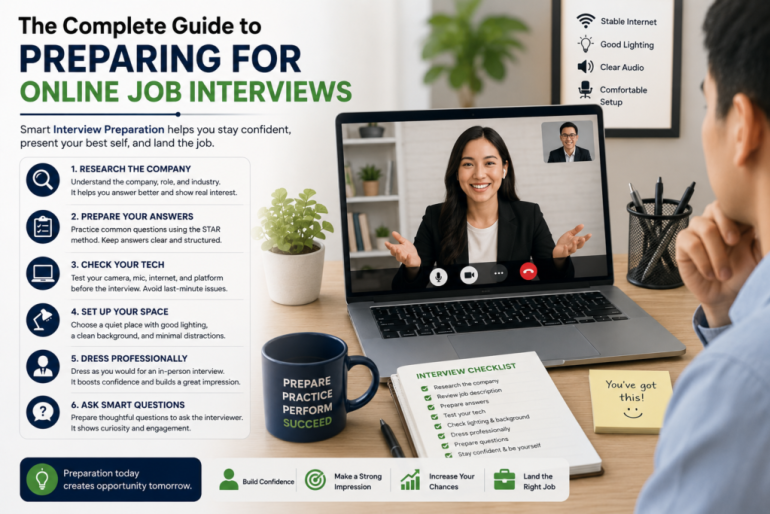
This complete guide will walk you through everything you need to know about Interview Preparation for online job interviews.
What Is an Online Job Interview?
An online job interview is a job interview conducted through video conferencing platforms such as Zoom, Google Meet, Microsoft Teams, Skype, or a company’s own hiring platform.
Instead of meeting the recruiter in person, you speak with them through your computer, tablet, or smartphone. Online interviews may be live, where you speak directly with the interviewer, or pre-recorded, where you answer questions on camera without a live person present.
Online interviews are commonly used for:
- Remote jobs
- Hybrid roles
- International hiring
- First-round interviews
- Graduate recruitment
- Freelance roles
- Tech jobs
- Customer service roles
- Administrative positions
- Executive interviews
No matter the role, your goal is the same: show that you are qualified, prepared, and professional.
Why Interview Preparation Matters for Online Interviews
Online interviews can feel more relaxed because you are at home, but they still require serious preparation. In fact, they may require even more preparation because small technical or environmental issues can affect your performance.
Good Interview Preparation helps you:
- Reduce nervousness
- Avoid technical problems
- Answer questions clearly
- Present yourself professionally
- Make better eye contact on camera
- Keep your environment distraction-free
- Show confidence and readiness
- Leave a strong impression on recruiters
When you prepare properly, you appear more organized and reliable. Recruiters notice candidates who take the interview seriously.
1. Research the Company Before the Interview
Before any interview, you should understand the company. This helps you answer questions with confidence and show genuine interest.
Research the company’s:
- Products or services
- Mission and values
- Target customers
- Industry
- Recent projects
- Work culture
- Competitors
- Job requirements
You do not need to memorize everything. Focus on the information that connects to the role you want.
For example, if you are applying for a marketing role, look at the company’s website, social media pages, and content style. If you are applying for a customer service role, understand what type of customers the company serves.
This preparation helps you answer questions like:
- “Why do you want to work here?”
- “What do you know about our company?”
- “How can you contribute to our team?”
A strong answer shows that you did more than just apply randomly.
2. Understand the Job Description
The job description is one of your best interview preparation tools. It tells you what the employer needs.
Read the job description carefully and identify:
- Required skills
- Main responsibilities
- Tools or software mentioned
- Experience level
- Soft skills
- Qualifications
- Performance expectations
Then prepare examples from your experience that match those requirements.
For example, if the job description mentions communication, teamwork, and problem-solving, prepare stories that show how you used those skills. If it mentions Excel, CRM software, content writing, coding, or project management, be ready to explain your experience with those tools.
The more your answers match the job description, the more relevant you sound.
3. Prepare Your Interview Answers
Many online interviews include common questions. Preparing your answers in advance helps you avoid rambling or freezing during the interview.
Common interview questions include:
- Tell me about yourself.
- Why are you interested in this role?
- What are your strengths?
- What are your weaknesses?
- Why should we hire you?
- Tell me about a challenge you solved.
- Describe a time you worked with a team.
- What are your salary expectations?
- Where do you see yourself in the future?
- Do you have any questions for us?
Do not memorize answers word for word. Instead, prepare key points so your answers sound natural.
A good answer should be clear, relevant, and connected to the role.
4. Use the STAR Method for Strong Answers
The STAR method is a simple way to answer behavioral interview questions. It helps you explain your experience in a structured way.
STAR means:
Situation: What was happening? Task: What were you responsible for? Action: What did you do? Result: What happened because of your action?
Example:
Question: Tell me about a time you solved a problem at work.
Answer: “In my previous role as a customer support assistant, we had repeated complaints about delayed email responses. I was asked to help improve the response process. I organized common customer questions into categories, created response templates, and suggested a daily tracking sheet for unresolved issues. As a result, our team reduced response delays and handled customer inquiries more consistently.”
This answer works because it gives context, explains your action, and shows a result.
5. Prepare a Strong “Tell Me About Yourself” Answer
“Tell me about yourself” is often the first question in an interview. Your answer should not be your full life story. It should be a short professional introduction.
Use this structure:
- Your current role or background
- Relevant experience or skills
- A key achievement or strength
- Why you are interested in the role
Example:
“I am a customer service professional with experience handling client inquiries, resolving complaints, and maintaining accurate customer records. In my previous role, I supported daily communication with customers and helped improve response consistency within the team. I enjoy solving problems and creating positive customer experiences, which is why I am excited about this opportunity.”
Keep your answer focused and role-specific.
6. Test Your Technology Before the Interview
Technology problems can make an online interview stressful. Test everything before the interview day.
Check your:
- Internet connection
- Camera
- Microphone
- Speaker or headphones
- Laptop battery
- Video platform link
- Browser or app access
- Screen sharing, if needed
Join the meeting a few minutes early so you can confirm that everything is working. If the platform requires installation, install it before the interview.
Also keep your phone nearby in case the interviewer needs to contact you. However, keep it silent during the interview.
7. Choose a Professional Interview Space
Your environment affects how the recruiter sees you. Choose a quiet, clean, and well-lit space.
Your interview space should have:
- Minimal background distractions
- Good lighting
- Comfortable seating
- Stable internet
- Low noise
- A clean desk or table
- A professional-looking background
Avoid interviewing in a noisy room, public place, or messy background. If you cannot control your background, use a simple virtual background if the platform allows it. Choose something plain and professional.
8. Set Up Good Lighting
Lighting can make a big difference in how you appear on camera. Poor lighting can make your video look unclear or unprofessional.
The best setup is to face natural light from a window or use a soft lamp in front of you. Avoid sitting with a bright window behind you because it can make your face appear dark.
Simple lighting tips:
- Keep light in front of your face
- Avoid harsh shadows
- Do not sit directly under strong overhead light
- Avoid bright backgrounds behind you
- Test your camera view before the interview
You do not need expensive equipment. You just need to be clearly visible.
9. Dress Professionally
Even though the interview is online, your appearance still matters. Dress as you would for an in-person interview.
Choose clothing that matches the role and company culture. For most interviews, a neat shirt, blouse, jacket, or professional top works well.
Avoid:
- Distracting patterns
- Very bright colors
- Casual home clothes
- Excessive jewelry
- Clothing that blends into your background
Dressing professionally can also improve your confidence. When you look prepared, you may feel more prepared.
10. Practice Looking at the Camera
In online interviews, eye contact works differently. If you look only at the interviewer’s face on the screen, it may seem like you are looking down. To create stronger eye contact, look at the camera when speaking.
You do not need to stare at the camera constantly. But during important points, look directly at it. This helps you appear confident and engaged.
You can also place the video window near your camera so your eyes stay close to the right position.
11. Improve Your Body Language
Your body language matters even in a virtual interview. Recruiters can still notice your posture, facial expression, and energy.
Good online interview body language includes:
- Sitting upright
- Smiling naturally
- Nodding when listening
- Keeping your hands relaxed
- Avoiding fidgeting
- Looking attentive
- Keeping your shoulders open
- Staying centered in the frame
Avoid leaning too far back, looking away often, checking your phone, or appearing distracted.
Your body language should show that you are interested and professional.
12. Speak Clearly and Slowly
Online interviews sometimes have slight delays, so clear communication is important. Speak at a steady pace and pause when needed.
Tips for speaking well:
- Keep answers focused
- Avoid talking too fast
- Pause before answering difficult questions
- Use simple professional language
- Avoid filler words like “um” and “you know”
- Check that the interviewer has finished speaking before you respond
If there is a delay or sound issue, remain calm. You can politely say:
“Sorry, the audio broke up for a moment. Could you please repeat the question?”
This is better than pretending you heard something you missed.
13. Keep Notes Nearby, But Do Not Read From Them
One advantage of online interviews is that you can keep brief notes nearby. Use notes to remind yourself of key points, not as a script.
Your notes can include:
- Company facts
- Job requirements
- Your top achievements
- Questions to ask
- Names of interviewers
- Salary range, if needed
Keep your notes short and easy to glance at. If you read long paragraphs, the recruiter may notice and your answer may sound unnatural.
14. Prepare Questions for the Interviewer
At the end of the interview, you will often be asked, “Do you have any questions for us?” Always prepare questions.
Good questions include:
- What does success look like in this role?
- What are the main priorities for the first few months?
- How is the team currently structured?
- What tools or systems does the team use?
- What are the biggest challenges in this position?
- How do you support professional development?
- What are the next steps in the hiring process?
Avoid asking only about salary, holidays, or benefits in the first interview unless the recruiter brings it up. Focus first on the role, team, and expectations.
15. Prepare for Pre-Recorded Video Interviews
Some employers use pre-recorded interviews. In this format, you receive questions and record your answers without speaking to a live interviewer.
For pre-recorded interviews:
- Read all instructions carefully
- Test your camera and microphone
- Practice before recording
- Keep answers short and structured
- Look at the camera
- Smile and speak clearly
- Avoid long pauses
- Submit before the deadline
Pre-recorded interviews can feel awkward because there is no live feedback. Practice answering questions on camera so you become more comfortable.
16. Avoid Common Online Interview Mistakes
Many candidates make simple mistakes that weaken their performance.
Avoid:
- Joining late
- Using poor lighting
- Having a messy background
- Forgetting to test your microphone
- Reading answers from a script
- Looking at your phone
- Interrupting due to audio delay
- Speaking too casually
- Giving long, unfocused answers
- Not researching the company
- Failing to ask questions
- Dressing too casually
- Using an unprofessional username or profile photo
Small mistakes can make you appear unprepared. Good Interview Preparation helps you avoid them.
17. Prepare Your Resume and Documents
Before the interview, keep your resume, cover letter, portfolio, and job description nearby. The interviewer may ask about your experience, achievements, or specific projects.
Have digital copies ready in case you need to share them.
Documents to prepare include:
- Resume or CV
- Cover letter
- Portfolio
- Certificates
- References
- Work samples
- Job description
- Notes on achievements
Using MyCVCreator, job seekers can create professional resumes, CVs, and cover letters that support their interview preparation and help them present their qualifications more clearly.
18. Practice With Mock Interviews
Practice is one of the best ways to improve. A mock interview helps you test your answers, body language, speaking pace, and confidence before the real interview.
You can practice with:
- A friend
- A mentor
- A career coach
- A family member
- A video recording of yourself
- An online interview preparation tool
Record yourself answering common questions. Then review your video and check:
- Did you speak clearly?
- Did you look at the camera?
- Were your answers too long?
- Did you sound confident?
- Was your background professional?
- Was your lighting good?
MyCVCreator’s interview preparation tools can help job seekers practice and build confidence before meeting recruiters.
19. Follow Up After the Interview
After the interview, send a short thank-you message. This shows professionalism and continued interest.
Example:
Subject: Thank You for the Interview
Dear Hiring Manager,
Thank you for taking the time to speak with me about the role. I enjoyed learning more about the position and the team. I am excited about the opportunity to contribute my skills and experience, and I look forward to the next steps.
Best regards, Your Name
Keep the message simple and professional. Send it within a reasonable time after the interview.
Online Job Interview Checklist
Before your interview, review this checklist:
- Research the company
- Study the job description
- Prepare answers to common questions
- Practice the STAR method
- Test your camera and microphone
- Check your internet connection
- Choose a quiet location
- Set up good lighting
- Dress professionally
- Keep your resume nearby
- Prepare questions for the interviewer
- Join the meeting early
- Speak clearly and confidently
- Follow up after the interview
This checklist helps you stay organized and ready.
Why MyCVCreator Helps With Interview Preparation
MyCVCreator is built to support job seekers at every stage of the application process. Beyond creating professional resumes and cover letters, MyCVCreator also helps users prepare for interviews with tools designed to improve confidence and readiness.
With MyCVCreator, job seekers can:
- Build professional resumes
- Create polished cover letters
- Use career tools to improve applications
- Practice interview preparation
- Organize job search documents
- Present themselves more confidently
Strong Interview Preparation begins before the interview invitation. It starts with a good resume, a targeted cover letter, and a clear understanding of your value.
Final Thoughts
Online job interviews are now a major part of hiring. To succeed, you need more than a quiet room and a working camera. You need preparation, confidence, clear answers, professional body language, and a strong understanding of the role.
Good Interview Preparation helps you reduce stress, avoid mistakes, and communicate your value clearly. Research the company, study the job description, practice your answers, test your technology, and prepare your environment before the interview.
With the right preparation and tools from MyCVCreator, job seekers can approach online interviews with confidence and give recruiters a strong reason to move them forward in the hiring process.