



AI music video generators have shifted from novelty to real workflow. You can now turn a track into a finished, shareable video in minutes, sometimes in a single click. But “generated” doesn’t automatically mean “cinematic.” The cinematic feel comes from pacing, cohesion, and a visual language that holds together like a mini film, not a random montage.
This article compares five AI music video generators that consistently aim for cinematic output. The goal is not to dunk on any tool. Each one serves a different type of creator. The ranking prioritizes how reliably you can achieve cinematic results with a practical workflow.
What “Cinematic” Means In AI Music Videos
For this article, “cinematic” usually includes:
- Beat-synced pacing (cuts and motion follow the song’s structure)
- Cohesive look (scenes feel like they belong to the same world)
- Mood alignment (lighting and tone match the track’s emotion)
- Camera language (movement and shot variety feel intentional)
- A clean path to export (fast iteration, platform-ready formats)
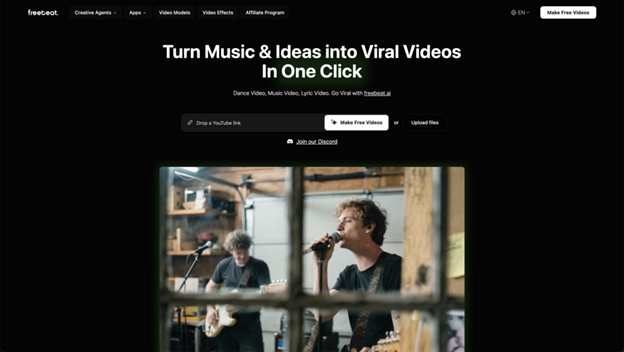
1. Freebeat AI: One-Click Beat-Synced Cinematic Cuts
Snapshot:
Freebeat AI focuses on turning a track into a finished video quickly, with pacing driven by beat and mood analysis. It’s built for creators who want cinematic rhythm without building an edit timeline manually.
Ideal Fit:
- Creators who want cinematic pacing with minimal setup
- Action-trailer energy, high-impact cuts, and cohesive mood
- Fast iteration across styles, formats, and model options
Cinematic Signals:
- Beat + mood-driven pacing: aligns transitions to musical structure and intensity shifts
- Style steering via prompts: define a consistent cinematic “world” (“neon noir chase,” “retro synth action,” “desert pursuit”)
- Narrative coherence via consistency options: character consistency and dual character mode support continuity across scenes
- Multi-model flexibility: switch models inside one workflow to match the look you want
- Social-ready exports: presets for common formats like 9:16 and 16:9
Controls & Outputs:
Freebeat’s control style is “direct the vibe, then iterate.” You steer theme, mood, and stylistic identity with prompts, and you can switch model options when you want a different cinematic texture. On the output side, it’s designed to export in formats that match real publishing needs, including vertical and widescreen presets.
2. Revid AI: Music-Reactive Visualizer Energy With Cinematic Mood
Snapshot:
Revid’s AI music video generator is positioned around music-reactive visuals and cinematic-style outputs, especially useful when you want motion and overlays to respond clearly to the track’s energy.
Ideal Fit:
- Creators who want audio-reactive design language (visualizers, overlays, structured motion)
- EDM, instrumental, ambient, and mood-heavy tracks
- Quick variations where motion rhythm is a core part of the aesthetic
Cinematic Signals:
- Music-reactive motion emphasis, supporting rhythm-driven presentation
- Preset-driven styling that can help maintain cohesion across a full video
- Variation-friendly creation flow that encourages multiple stylistic passes
Controls & Outputs:
Revid’s controls lean into “visualizer language.” You can choose styles that foreground audio-reactive motion and structured overlays. Outputs are well-suited for creators who want cinematic mood with a clearly synchronized design layer, rather than purely scene-driven storytelling.
3. NeuralFrames: Art-Forward Cinematic Style With Deep Aesthetic Steering
Snapshot:
NeuralFrames is positioned for creators who care deeply about aesthetics and want a workflow that balances automation with meaningful style control.
Ideal Fit:
- Artists targeting a stylized cinematic look
- Projects where visual language matters as much as rhythm
- Iterating toward a polished, cohesive aesthetic
Cinematic Signals:
- Style control focus that supports deliberate art direction across the whole piece
- Cohesion through consistent aesthetic choices and guided iterations
- Music-video-centered positioning rather than general-purpose video generation
Controls & Outputs:
NeuralFrames is a strong fit when your cinematic goal is a specific look: consistent texture, tone, and visual identity across the entire track. It’s especially useful when you want to keep refining style choices until the video reads like a single, intentional world.
4. LTX Studio: Director-Like Scene Planning For Narrative Music Videos
Snapshot:
LTX Studio suits creators who approach music videos like a directed sequence, emphasizing scene design, camera choices, and structured shot progression.
Ideal Fit:
- Narrative music videos with intentional shot progression
- Creators who want storyboard-style planning and sequencing
- Cinematic meaning “directed scenes,” not just energetic edits
Cinematic Signals:
- Storyboard-like control supporting planned progression across scenes
- Camera and animation customization aligned with film-language thinking
- Story-first framing for creators building a structured visual arc
Controls & Outputs:
LTX is the most director-leaning option here. Its core strength is letting you think in scenes and camera choices, then build a sequence that feels planned rather than purely generated. If your definition of story control includes shot progression and scene continuity, this category is where LTX naturally stands out.
5. Aimusicgen.ai: Fast, Platform-Ready Music Videos With Quick Variations
Snapshot:
Aimusicgen.ai emphasizes quick creation and platform-friendly outputs, making it practical for fast publishing cycles across formats.
Ideal Fit:
- Teams and creators producing frequent releases and variations
- Short-form publishing pipelines
- Platform-oriented export needs across channels
Cinematic Signals:
- Fast generation framing that supports rapid iteration
- Platform-first output positioning for common social destinations
- Theme/lyrics alignment options that can support coherence across scenes
Controls & Outputs:
Aimusicgen’s value is straightforward: move quickly, keep the output aligned to distribution needs, and generate multiple variations for different publishing contexts. It’s a practical choice when cinematic means “high-impact, shareable presentation,” especially in social-first formats.
Quick Pick Guide
- Want cinematic rhythm with minimal setup? Freebeat AI
- Want audio-reactive visualizer energy? Revid AI
- Prioritizing stylized, art-forward aesthetics? NeuralFrames
- Want director-style scene planning? LTX Studio
- Need speed-first, platform-optimized variations? ai
Final Thoughts
“Cinematic” can mean trailer pacing, art-film mood, or director-style shot progression. The tools above approach those goals from different angles. The most reliable move is choosing a platform whose controls match the cinematic language you want, then iterating until the visuals feel like they live in the same world as your track.
If you want, I can tighten the transitions and add more film-forward vocabulary (montage logic, escalation, “act structure” across song sections) to make this read even more like a The Action Elite feature, while keeping all product coverage neutral.
FAQ
Do I need editing experience to use an AI music video generator?
Not necessarily. Most tools are designed so you can start with a track and generate a complete video quickly. Editing experience mainly helps when you want tighter control over narrative structure, pacing decisions, or consistency across multiple versions.
What inputs do these platforms typically support (songs, links, or files)?
Most AI music video generators support uploading an audio file, while some also accept music links depending on the platform. For example, Freebeat highlights music-link inputs (Spotify, YouTube, SoundCloud, Suno) alongside uploads.
How do I keep the visuals consistent across scenes so it doesn’t feel random?
Consistency usually comes from two things: (1) keeping a stable visual direction (mood, setting, lighting, theme), and (2) using tools that support continuity features. Freebeat emphasizes character consistency and even dual character mode, which can help maintain a “same universe” feel across cuts。
How can I get more “action trailer” energy without complicated settings?
Aim for clarity and escalation. Choose a single cinematic direction (one setting, one mood), keep it consistent, and prioritize pacing that builds with the track’s intensity. Tools that analyze tempo and mood can make this easier by aligning transitions to the song’s structure。