



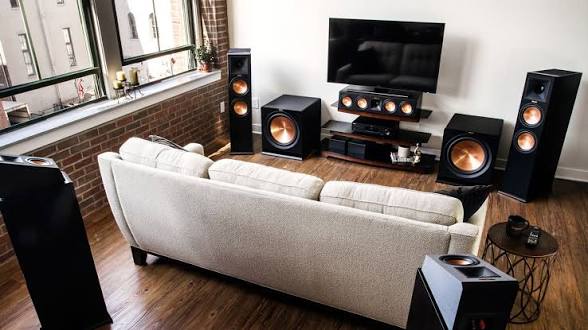
Action movies are designed to feel larger than life. Explosions, high-speed chases, dramatic camera movements, and detailed sound effects all depend on more than just the movie itself. The quality of the home cinema setup can determine whether those moments feel immersive or simply look like another video playing on a television.
For viewers researching IPTV Srbija options alongside a modern home cinema setup, the goal should be to build an entertainment system where picture quality, frame rates, sound, internet performance, and device compatibility work together. A strong setup does not necessarily require the most expensive equipment. It requires choosing components that match the way you actually watch movies and live content.
Start With the Display
The television or projector is the foundation of any home cinema. For action movie fans, the display needs to handle fast movement without creating distracting blur, stuttering, or other visual problems.
Modern televisions offer several technologies designed to improve motion and picture quality. OLED displays are known for strong contrast and fast pixel response, while many LED and Mini-LED televisions can deliver high brightness and impressive HDR performance.
Screen size also matters.
A larger screen can create a more cinematic experience, but bigger is not automatically better. The ideal size depends on viewing distance, room dimensions, and the resolution of the content.
For a typical living room, a 4K television in the 55-to-75-inch range can provide a strong balance between immersion and practicality. Larger rooms can support bigger screens or projectors, while smaller spaces may benefit from a more compact display.
The important point is to avoid choosing a screen based only on its size. A television with good motion handling, low input lag, strong contrast, and appropriate HDR support can make action sequences look much better than a larger screen with weaker processing.
Why Frame Rate Matters for Action Movies
Frame rate is one of the most important technical details for fast-moving content.
Traditional movies are commonly produced at 24 frames per second. This creates the familiar cinematic motion associated with films. However, television broadcasts, sports, and some digital content can use higher frame rates such as 50 or 60 frames per second.
The difference becomes particularly noticeable during rapid movement.
A car moving quickly across the screen, a camera following a fight scene, or a fast transition between locations can expose weaknesses in motion handling. If the television cannot process the content properly, viewers may notice judder or blur.
This is why action movie fans should understand both the frame rate of their content and the refresh rate of their television.
Refresh Rate Explained
Refresh rate refers to how many times a display can update its image each second. A 60Hz display refreshes the image up to 60 times per second, while a 120Hz display can refresh up to 120 times.
A higher refresh rate does not automatically make a 24fps movie become 120fps. Instead, it gives the television more flexibility when processing different types of content.
A 120Hz television can be especially useful for people who watch movies, live television, sports, and gaming on the same screen.
It can also help with motion processing because the display has more opportunities to present frames smoothly.
However, viewers should be careful with artificial motion smoothing. Some televisions create additional frames to make movies appear smoother. While this can be useful for certain live content, excessive motion interpolation can create the unnatural “soap opera” effect that many movie fans dislike.
For cinematic movies, preserving the original creative look is often more important than simply making everything appear extremely smooth.
The Importance of 4K and HDR
Resolution is another major part of a modern home cinema.
4K Ultra HD provides four times the number of pixels found in Full HD. This can make a significant difference on larger screens, particularly when viewers sit close enough to see the additional detail.
Action movies benefit from 4K because their visuals often contain complex environments, detailed costumes, fast-moving objects, and large-scale effects.
HDR, or High Dynamic Range, complements higher resolution by improving the range between dark and bright areas of an image.
A well-produced HDR movie can show bright explosions while retaining detail in darker parts of the scene. This is especially useful in night-time action sequences, underground scenes, and movies that use strong contrast between light and shadow.
But HDR performance depends on more than simply having an HDR logo on the television. Brightness, contrast, panel technology, and content quality all influence the final result.
Build the Right Sound System
A home cinema does not feel complete without good audio.
Action movies often use sound to create as much impact as the picture. Engines, explosions, background music, dialogue, and environmental effects can come from different directions and distances.
A basic television speaker system can reproduce these sounds, but a dedicated soundbar or surround sound system can create a much more immersive experience.
For smaller rooms, a quality soundbar with a subwoofer may be enough. It takes less space and is easier to install than a full surround system.
For dedicated cinema rooms, a multi-speaker setup can provide a stronger sense of direction. Audio formats such as Dolby Atmos can also create a more three-dimensional sound field when supported by the content and equipment.
The subwoofer deserves particular attention for action movies. Low-frequency effects give explosions, vehicle engines, and other dramatic moments physical impact.
However, more bass is not always better. Excessive bass can overpower dialogue and make the entire soundtrack difficult to balance.
Streaming Quality Depends on the Network
Even the best television and sound system cannot compensate for poor internet performance.
Modern streaming services can require substantial bandwidth, particularly when users watch high-resolution content. A stable connection is often more important than simply having a high advertised download speed.
Network congestion, Wi-Fi interference, router placement, and multiple connected devices can all affect streaming performance.
For example, a household might have a fast internet connection but still experience buffering because the television is located far from the router or connected through a congested wireless band.
For demanding home cinema setups, Ethernet can be an excellent option when available. A wired connection removes many of the variables associated with wireless interference.
When Ethernet is not practical, placing the router in a central location and using a modern Wi-Fi standard can improve reliability.
Choosing the Right Streaming Device
The television’s built-in operating system may be enough for many viewers, but a dedicated streaming device can offer additional flexibility.
Streaming boxes and sticks can provide access to applications, media platforms, and other services through a single interface. They can also receive software updates independently from the television itself.
This can be useful when an older television still has excellent picture quality but its built-in software has become slow or outdated.
When choosing a streaming device, check its supported resolution, HDR formats, audio compatibility, Wi-Fi capabilities, and application support.
Compatibility matters because not every device supports every format or application in exactly the same way.
Where Live Television Fits Into a Home Cinema
A modern home cinema is no longer limited to movies.
Many households use the main television for live channels, sports, news, documentaries, series, and on-demand content. This means the entertainment setup should be flexible enough to handle different types of viewing.
Services such as srbtv can fit into this broader approach when viewers want to bring live television and digital entertainment together through an internet-connected setup.
The important consideration is making sure the service, application, and viewing device are compatible. Users should also check the provider’s terms, supported locations, available channels, and connection requirements before subscribing.
This is particularly important when building a system around multiple devices.
One Home Cinema, Multiple Devices
Modern households rarely rely on only one screen.
A television may be used for family movie nights, while smartphones and tablets handle personal viewing. A computer may be used for entertainment during work breaks, and a second television may be installed in a bedroom.
A flexible streaming setup should account for these different viewing habits.
Before choosing a service, consider how many devices need access and whether simultaneous viewing is supported under the relevant subscription. Some services limit the number of active connections, while others offer different plans for households with multiple users.
Checking these details before subscribing can prevent unnecessary compatibility problems later.
Make Wi-Fi Work for High-Quality Streaming
Wi-Fi performance deserves more attention than it usually receives.
A television placed behind furniture, inside a cabinet, or far from the router may receive a weaker signal than a smartphone in the same room. Walls and other electronic devices can also affect wireless performance.
If buffering occurs regularly, the first step should be identifying whether the problem is the internet connection, wireless network, streaming application, or content source.
A simple speed test near the television can provide useful information. If the connection is strong near the router but weak at the television, improving network coverage may solve the problem.
Mesh Wi-Fi can also help larger homes where a single router struggles to provide consistent coverage.
Reduce Unnecessary Picture Processing
Modern televisions include dozens of picture settings.
Some improve the image, while others can make it look less natural.
For movie watching, viewers may want to explore picture modes designed for cinema or filmmaker-style viewing. These modes often reduce aggressive processing and aim to preserve the original appearance of the content.
Sharpness should also be used carefully. Increasing sharpness does not create genuine detail that was not present in the source. Excessive sharpening can instead create artificial edges around objects.
Likewise, dynamic contrast and aggressive noise reduction may alter the appearance of a high-quality movie.
A good starting point is often to select an appropriate picture preset and make small adjustments rather than changing every setting at once.
Create a Comfortable Viewing Environment
Home cinema quality is not only about technology.
Lighting has a major effect on how viewers perceive the screen. Direct sunlight or strong lamps reflected on the television can reduce contrast and make dark scenes difficult to see.
For evening movie sessions, controlled ambient lighting can create a more comfortable environment.
Curtains or blinds can help during daytime viewing. Soft lighting behind or around the television can also reduce eye strain without directly reflecting on the screen.
Seating position matters too.
The primary viewing seat should ideally be positioned directly in front of the display rather than far off to one side. This helps viewers experience consistent brightness, contrast, and color.
Think About Content Quality
A powerful home cinema system cannot create missing detail.
If the source is heavily compressed or low resolution, upgrading the television will not magically turn it into native 4K content.
This is why the quality of the content source matters as much as the hardware.
When available, choose high-quality streams that match the capabilities of your display and internet connection. If a movie is available in multiple quality levels, the highest practical quality can provide better detail and fewer compression artifacts.
Audio quality follows the same principle.
A premium sound system can reveal weaknesses in heavily compressed audio that may not have been noticeable through television speakers.
Next-Generation Streaming and Home Entertainment
The next stage of home entertainment is increasingly focused on integration.
Instead of having separate systems for television, movies, music, gaming, and personal media, connected devices are bringing these experiences together.
Smart TVs, streaming platforms, voice assistants, wireless speakers, game consoles, and mobile devices can all become part of one entertainment environment.
This also means that software is becoming just as important as hardware.
Regular application updates can improve stability, add features, and resolve compatibility problems. Television firmware updates can also introduce improvements to picture processing and connected services.
Keeping devices updated is therefore a simple but useful part of maintaining a modern home cinema.
Don’t Forget Privacy and Account Security
Streaming devices are connected to the internet, so basic account security should not be ignored.
Use strong, unique passwords for streaming accounts and avoid entering login information into unfamiliar applications. Only install applications from trusted sources and review the permissions they request.
It is also worth checking whether a streaming service clearly explains its subscription terms, cancellation process, privacy practices, and supported devices.
These small checks can prevent larger problems later.
A Home Cinema Should Match Your Viewing Habits
There is no single perfect home cinema setup.
Someone who watches mostly movies may prioritize a large 4K display, strong HDR performance, and surround sound. A sports fan may care more about motion handling and high refresh rates. A household that watches a mixture of live television and streaming content may prioritize application compatibility and reliable internet connectivity.
The best approach is to build around actual viewing habits.
Start with the display, then consider audio, network performance, streaming devices, and comfort. This avoids spending money on features that may never be used.
Final Takeaway
A serious home cinema setup is more than a large television.
For action movie fans, the experience depends on how the display handles motion, how accurately it reproduces HDR content, how quickly it responds to changing scenes, and how effectively the sound system delivers everything from quiet dialogue to powerful explosions.
Streaming adds another layer to the experience. Reliable internet, compatible applications, high-quality content, and properly configured devices all contribute to consistent playback.
The good news is that viewers do not need to build everything at once. A quality display, reliable connection, capable audio system, and carefully selected streaming options can gradually turn an ordinary living room into a much more immersive entertainment space.
The real question is not how much technology you can fit into your living room, but which combination of technology actually makes the way you watch movies better.
FAQs
What refresh rate is best for action movies?
A 120Hz television can be a versatile choice because it handles different types of content well, including movies, sports, and gaming. However, the original frame rate of the content still matters, and higher refresh rate does not automatically make every movie look better.
Is 4K necessary for a home cinema?
4K is not strictly necessary, but it can provide noticeably more detail, especially on larger screens and at appropriate viewing distances. The quality of the source also affects how much benefit viewers receive.
Is a soundbar enough for action movies?
A good soundbar can provide a major improvement over built-in television speakers and may be ideal for smaller rooms. Viewers wanting stronger surround effects can consider a dedicated multi-speaker system.
Why does my streaming video keep buffering?
Buffering can be caused by several factors, including weak Wi-Fi, network congestion, insufficient connection stability, device limitations, or problems with the streaming source. Testing the connection near the viewing device can help identify the issue.
Should I use Ethernet or Wi-Fi for my home cinema?
Ethernet is generally useful when a stable wired connection is practical. Modern Wi-Fi can also work very well when the router and network are properly configured and the signal is strong where the television or streaming device is located.