



Cracked screen, dead battery, charging fault or a laptop that will not start? Here is a practical way to get from sudden device failure to a sensible repair decision around Jurong Point and Boon Lay.
Few things kill momentum faster than a phone or laptop suddenly failing in the middle of the day. A dead battery can cut off access to messaging, maps and digital payments. A broken display can make a perfectly functional phone unusable. A MacBook that refuses to charge can derail work, study or a submission even when the rest of the machine is still in good condition.
For residents, students and commuters in Singapore’s west, the priority is usually simple: get the device working again without wasting time or paying for the wrong repair. The challenge is that the first visible symptom does not always reveal the actual fault.
A good response therefore looks less like panic and more like a short playbook: identify the symptom, protect the device and its data, get a diagnosis, compare the quote, then test the repair before collection.
Step 1: Identify what actually happened
Start by describing the behaviour, not by guessing the replacement part. Tell the technician exactly what changed: the phone only charges when the cable is tilted, the screen has green lines but touch still works, the laptop powers on but shows no image, or the battery percentage drops rapidly under light use.
Those details matter because several faults can create similar symptoms. A charging problem may involve the cable, port, battery or charging circuitry. A black screen can be a display failure even if the phone is still receiving calls. A no-power laptop may have a battery, charger, USB-C, power-management or board-level issue.
| The fastest route to the right repair is usually a clear symptom description followed by diagnosis – not choosing a part before the device has been checked. |
Step 2: Protect the device before the problem gets worse
If the device still works, back up important files before repair whenever practical. If the charging port is loose, avoid repeatedly forcing the connector at an angle. If the screen is badly cracked, minimise pressure on the panel. If there has been liquid exposure, avoid repeated charging and power-on attempts.
These simple actions are less about fixing the fault yourself and more about avoiding additional damage while you arrange a proper assessment.
Step 3: Get a diagnosis before committing to an expensive part
Diagnosis is where a useful repair experience begins. It separates an isolated, economical fault from a device that has several problems at once.
For example, a weak battery on an otherwise healthy phone can be a straightforward repair decision. A very old phone with display damage, a swollen battery and motherboard instability is a different calculation. The same applies to laptops: a failed battery or charging port is not financially equivalent to extensive liquid damage across the logic board.
A simple five-step path from sudden device failure to a completed repair.
Step 4: Compare more than the headline price
A low price can be attractive, but it is only useful when you know what it includes. Two quotations for the same phone may involve different display grades, battery qualities, labour, warranty periods or diagnostic work.
| Compare | What to confirm | Why it matters | Useful question |
| Diagnosis | Likely cause of the symptom | Prevents unnecessary part replacement | What failed your test? |
| Replacement part | Part type or quality grade | Different parts can perform differently | What exact part is included? |
| Final price | Labour and expected charges | Avoids surprises after work begins | Is this the nett total? |
| Warranty | Length and coverage | Terms matter more than the word warranty | What is covered? |
| Data | Whether access or reset is needed | Devices hold sensitive information | Do you need my passcode? |
| Turnaround | Estimate after diagnosis | Simple and board-level jobs differ | When is collection realistic? |
Why Jurong Point works as a practical repair hub
Location is not a substitute for technical quality, but it affects the real cost of downtime. A repair can involve drop-off, collection and sometimes follow-up. That makes a transport-connected location especially useful when your phone or laptop is already disrupting the day.
Jurong Point is directly linked to Boon Lay MRT, with the Boon Lay Bus Interchange beside the mall. That gives residents and commuters from Jurong West, Pioneer, Lakeside, Nanyang, NTU, Tengah and other parts of the west a repair option that can fit around an existing journey rather than requiring a separate trip into town.
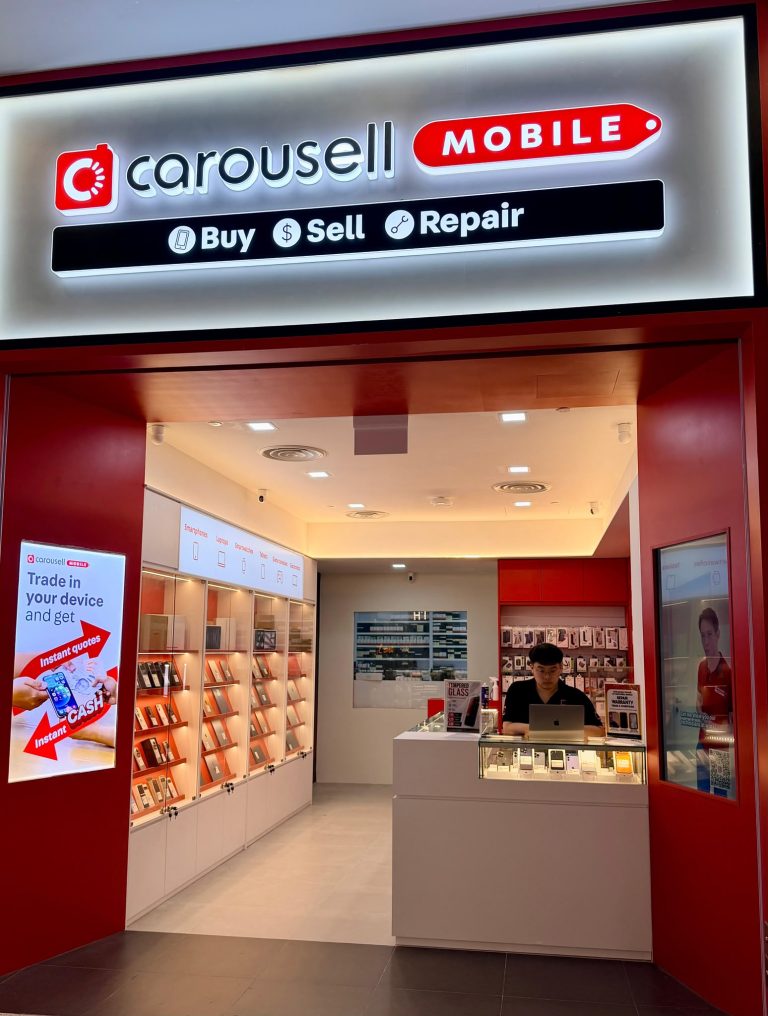
A local option is Citri Mobile phone and laptop repair at Jurong Point, operating inside CarousellMOBILE at #B1-34A, Singapore 648886. The outlet lists daily walk-in hours from 11am to 9pm and services phones, tablets, laptops, foldables and selected gaming devices.
A genuinely multi-device repair counter matters
Households rarely rely on a single brand anymore. One person may use an iPhone and MacBook, another a Samsung Galaxy, another a Google Pixel, while an iPad, Windows laptop, Apple Watch or gaming device is shared elsewhere in the home.
The Jurong Point outlet lists repair coverage across iPhone, Samsung Galaxy, Google Pixel, Xiaomi and Redmi, OPPO, Huawei, vivo, OnePlus, Honor, realme, ASUS, Sony, LG, Infinix and Motorola phones, as well as iPad, Apple Watch, MacBook, Microsoft Surface and selected Windows laptops.
That breadth is useful because the same symptom can look very different across device families. A Galaxy Z Fold inner display is not the same repair as a conventional Galaxy S-series screen. A MacBook no-power case requires a different diagnostic process from an iPhone battery replacement.
Common phone problems seen around a busy day
Cracked screen or sudden display lines
A fall can leave the glass visibly shattered, but display failures can also appear as flickering, vertical lines, black patches, ghost touch or a screen that remains dark while the device still produces sound or vibration. Ask whether the quotation covers the full display assembly and what replacement grade is being used.
Battery that will not make it through the commute
Short runtime, unexpected shutdowns or a battery percentage that falls quickly can point to battery deterioration. It is still worth checking the device rather than assuming every power issue is a battery problem, especially if overheating, charging instability or other faults appeared at the same time.
Charging only when the cable is held in position
A worn or obstructed charging port is common, but a damaged cable, battery or internal charging circuit can create similar behaviour. If the connector has to be pushed or twisted to maintain charging, stop repeatedly forcing it and arrange an inspection.
Water damage or sudden no-power failure
Liquid exposure is unpredictable because corrosion can affect components that are not immediately visible. A device may appear to recover and develop faults later. No-power cases are similarly broad: the cause can range from an isolated component to board-level damage.
Foldable phones need a more specific repair conversation
Foldables are now common enough that generic screen-repair language is no longer sufficient. The inner display, outer display, hinge, frame, flex cables, battery and charging system can create separate faults and very different costs.
Citri Mobile’s Jurong Point service information lists Samsung Galaxy Z Fold and Z Flip models, Honor Magic V-series devices, Google Pixel Fold and Pixel 9 Pro Fold, OPPO Find N-series foldables, Huawei Mate X-series models and Xiaomi Mix Fold devices, subject to the repair required and parts availability.
If a foldable fails, describe exactly what happens when the phone is open and closed, which screen is affected, whether touch works, and whether the hinge movement has changed. Those details help narrow down the likely repair path.
iPhone repair at Jurong Point
Typical iPhone problems include cracked displays, worn batteries, USB-C or Lightning charging faults, back-glass damage, camera problems, Face ID issues, water damage and no-power faults.
Citri Mobile participates in Apple’s Independent Repair Provider programme for eligible out-of-warranty iPhone repairs, providing access to genuine Apple parts, tools and diagnostics for supported work. Customers who specifically want genuine parts should confirm eligibility and the quoted option before repair.
Samsung, Pixel and Android repair in Jurong
Android repair benefits from exact model identification. A Samsung Galaxy S-series phone, A-series phone and Z-series foldable can use completely different displays, batteries and internal layouts. The same applies across Pixel, Xiaomi, OPPO, vivo, Honor, Huawei, OnePlus and realme devices.
Sending the full model before visiting can help a repair shop check parts availability and provide a more useful preliminary quotation.
MacBook, iPad and laptop downtime
Laptop failure can be more disruptive than phone damage because it often blocks work or study entirely. MacBook and Windows laptop problems can include damaged displays, batteries, keyboards, trackpads, charging issues, fans, ports and logic-board or motherboard faults.
For no-power cases, diagnosis is particularly important. A battery, charger or USB-C issue is not the same repair as liquid or board damage. If important files are not backed up, say so before any reset, storage replacement or board-replacement decision is made.
What builds trust in a repair shop
Trust in electronics repair is built through process rather than slogans. A customer should be able to understand what is wrong, what part is being offered, what the total price is, what happens if the repair does not solve the problem, and what warranty applies afterwards.
Citri Mobile’s Jurong Point page lists CaseTrust accreditation, Apple Independent Repair Provider participation for eligible iPhone work, Carousell Preferred Partner status and Carousell Best Service Provider awards for 2024 and 2025. It also publishes a 30-100 day warranty range for eligible completed repairs, transparent nett pricing and data-safe practices for most standard jobs.
Those are concrete points a consumer can compare against other providers instead of relying only on marketing claims.
Before you collect the device: test the basics
- Turn the device on and confirm normal startup.
- Check the display, touch response and brightness if screen work was done.
- Test charging with a known-good cable.
- Check cameras, speakers and microphones where relevant.
- Confirm Wi-Fi, Bluetooth and mobile-network functions if the repair involved related hardware.
- Ask for the warranty terms and keep the receipt or repair record.
Frequently asked questions about repair at Jurong Point
Where can I repair a phone inside Jurong Point?
Citri Mobile operates inside CarousellMOBILE at Jurong Point, #B1-34A, Singapore 648886. The outlet is linked conveniently to Boon Lay MRT through the mall.
Is the repair outlet near Boon Lay MRT?
Yes. Jurong Point is directly connected to Boon Lay MRT, with the bus interchange beside the mall.
Can I walk in without an appointment?
The Jurong Point outlet lists daily walk-ins from 11am to 9pm. Parts availability and repair time depend on the device and fault.
Which phone brands can be repaired at Jurong Point?
The outlet lists iPhone, Samsung Galaxy, Google Pixel, Xiaomi/Redmi, OPPO, Huawei, vivo, OnePlus, Honor, realme, ASUS, Sony, LG, Infinix and Motorola among its supported phone brands.
Can foldable phones be repaired in Jurong?
Selected Samsung, Honor, Google Pixel, OPPO, Huawei and Xiaomi foldable devices are listed for repair, subject to the specific fault and parts availability.
Can I repair a MacBook, iPad or Windows laptop there?
Yes. The Jurong Point service information includes MacBook, iPad, Microsoft Surface and selected Windows laptop repair.
Do common repairs finish on the same day?
Many screen, battery and charging repairs may be completed the same day depending on model, complexity and parts availability. Board-level and liquid-damage cases can take longer.
Will a repair erase my data?
Many standard hardware repairs can be performed without a factory reset, but this depends on the fault. Back up important information whenever possible and confirm the process before work begins.
What should I ask before approving a repair?
Ask for the diagnosis, replacement-part type, final nett price, expected turnaround and warranty coverage. Those five points make quotations much easier to compare.
The bottom line
When a device fails, the goal is not simply to replace the first part that seems related to the symptom. The better route is to protect the device, get a diagnosis, understand the quotation and test the finished repair.
For people across Jurong West, Boon Lay, Pioneer, Lakeside, Nanyang, NTU and nearby parts of Singapore’s west, a repair counter inside Jurong Point can make that process easier to fit into a normal day. The strongest outcome is a repair that is technically sensible, clearly priced and appropriate for the value of the device.
That is how a broken phone, foldable, tablet or laptop becomes a short interruption instead of a prolonged problem.