



Image generation gets the headlines, but in production workflows, the real workhorse capability is image editing — the ability to swap a background, change a product color, restyle a portion of an image, or apply a precise localized modification without regenerating the entire scene. This is where Google’s Gemini 3 Pro Image (Nano Banana 2) genuinely separates itself from older generative models: it natively accepts multiple reference inputs, understands localized instructions, and preserves untouched regions with rare fidelity.
But the editing experience varies dramatically depending on the platform exposing it — how many reference images you can pass in, whether masking is supported, how aspect ratios behave during edits, and whether the API surface even exposes editing as a first-class flow. This guide compares 10 leading Nano Banana API providers with a sharp focus on image editing and localized modification capability — looking at multi-reference support, edit-mode ergonomics, output controls, and the architectural choices that decide whether your editing pipeline feels like a precision tool or a blunt instrument.
TL;DR — Quick Comparison Table
| Platform | Multi-Reference Inputs | Edit Mode | Resolution Tiers | Best For |
| ApiPass | Up to 14 reference images | Native multi-image edit | 1K / 2K / 4K | Complex multi-reference edits at scale |
| Picsart | Multi-image edit | Editor-style flow | Standard tiers | Creative editing workflows |
| Replicate | Multi-image input | Standard edit flow | 1K / 2K / 4K | Reproducible edit pipelines |
| Segmind | Aspect-tiered edit endpoints | Format-aware edits | 1K / 2K / 4K | Format-segmented edit jobs |
| Kie | Multi-image reference | Lean edit endpoint | 1K / 2K / 4K | Lightweight edit workflows |
| WaveSpeed | Multi-image reference | Latency-tuned edits | 0.5K / 1K / 2K / 4K | Predictable timing on edits |
| BytePlus | Bundled multimodal edits | First-party edit features | 1K / 2K | Enterprise editing under SLA |
| NewportAI | Multi-image reference | Credit-accounted edits | 1K / 2K | Volume-discounted edits |
| PoYo | Multi-image reference | Fal-pattern edit flow | 1K / 2K / 4K | Fal-ecosystem edit pipelines |
| APIYI | Multi-image reference | Standard edit endpoint | 1K / 2K / 4K | Region-flexible edit access |
10 Best Nano Banana API Platforms for Image Editing Capability: A Detailed Breakdown
ApiPass
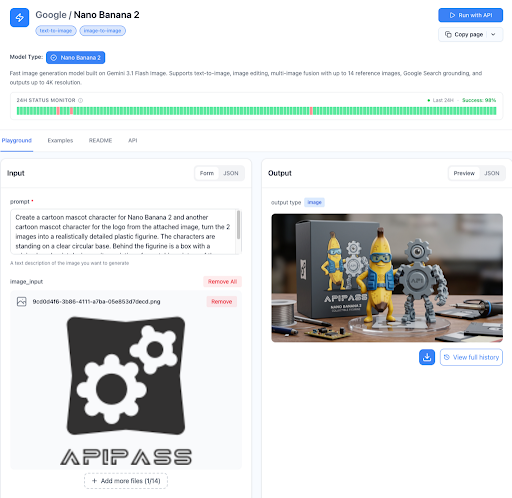
ApiPass exposes the full editing power of the Nano Banana 2 API with one of the most generous reference-input ceilings in the market — up to 14 reference images per request, all included at the base per-image rate with no surcharge for multimodal richness. That means you can pass in a hero product, a background plate, a style reference, a color reference, and a handful of detail crops, and Nano Banana 2 will weave them into a coherent edit that respects every input. Combined with full resolution flexibility (1K, 2K, 4K), the complete aspect-ratio range from 1:1 through 21:9, and optional grounding toggles for web and image search context, ApiPass turns editing from a constrained “swap one thing” operation into a true multi-reference compositing pipeline.
Editing Capability
What makes ApiPass stand out for editing is the combination of reference breadth and predictable behavior — the 14-input ceiling means complex edits (e.g., “place this product in this scene wearing this color in this lighting”) can be expressed in a single call instead of being chained across multiple steps. Each task returns explicit state and a reason field on failure, so when an edit doesn’t land the way you expected, you get actionable feedback rather than an opaque error.
Features
- Up to 14 reference inputs per request without surcharge.
- 1K, 2K, and 4K output resolutions.
- Full aspect-ratio range (1:1, 3:4, 4:3, 9:16, 16:9, 21:9, and more).
- Optional web search and image search grounding for context-aware edits.
- Async submit-and-callback pattern with webhook delivery.
- Clear task lifecycle states for monitoring edit jobs.
Pros & Cons
Pros:
- Highest reference-input ceiling in this comparison enables genuinely complex single-call edits.
- No surcharge on multi-reference inputs — multimodal editing is first-class.
- Lowest per-image price in the comparison.
- Grounding toggles add real-world context to edits when needed.
Cons:
- No interactive editor UI — purely API-driven.
- No typed SDKs yet.
Best For
Teams running complex multi-reference editing pipelines — product compositing, virtual try-on, scene replacement, style-transfer workflows — where the ability to pass many reference images in a single call is the difference between a clean integration and a multi-stage Rube Goldberg machine.
Picsart
Picsart brings a creative-editor heritage to its Nano Banana 2 API exposure, with editing ergonomics shaped by years of consumer-facing photo-editing product work. The result is a developer surface that feels closer to a creative tool than a raw inference endpoint.
Editing Capability
Picsart’s editing flow is designed around creative workflows — restyling, scene swaps, and look transfers — with input patterns familiar to anyone who’s built consumer photo apps. Reference handling is solid, though the ceiling is more modest than ApiPass’s.
Features
- Multi-image edit support tuned for creative workflows.
- Editor-style API ergonomics.
- Standard resolution tiers.
- Async REST integration.
Pros & Cons
Pros:
- Creative-editor heritage produces intuitive edit flows.
- Strong fit for consumer photo and design apps.
- Mature developer documentation.
Cons:
- Lower multi-reference ceiling than ApiPass.
- Per-image cost above the aggregator floor.
Best For
Consumer photo and design apps where editing ergonomics need to feel native to creative workflows rather than raw inference.
Replicate
Replicate exposes Nano Banana 2 editing through its mature inference platform, with version-pinned model hashes that make edit behavior reproducible across runs. For teams that need to re-run last month’s editing batch and get identical results, that reproducibility is the headline feature.
Editing Capability
Replicate’s editing endpoint accepts multiple reference images and produces consistent, reproducible results — particularly valuable for research workflows or regulated content pipelines where edit behavior needs to be auditable.
Features
- Multi-image input for editing tasks.
- Version-pinned model hashes for reproducible edits.
- First-class SDKs in Python, Node, Go, and Elixir.
- Permanent prediction URLs for every edit.
Pros & Cons
Pros:
- Reproducibility is unmatched for audit-sensitive edit workflows.
- Mature SDKs reduce integration friction.
- Permanent URLs simplify edit-history debugging.
Cons:
- Cold-start latency can spike on first edit after idle.
- Mid-pack per-image cost.
Best For
Research teams and regulated workflows where every edit needs to be reproducible and auditable from a permanent URL.
Segmind
Segmind takes a format-aware approach to editing, with aspect-ratio-tiered endpoints that let you submit edit jobs to a queue tuned for each output format. That isolation matters when an editing pipeline produces multiple aspect variants in parallel.
Editing Capability
Segmind’s per-aspect editing endpoints mean a 9:16 social edit and a 1:1 product edit run on separate queues — useful for production pipelines that produce multi-format outputs from a single source image.
Features
- Aspect-ratio-tiered Nano Banana 2 editing endpoints.
- Multi-image reference input.
- Python SDK plus standard HTTP integration.
- Webhook support.
Pros & Cons
Pros:
- Per-aspect endpoint isolation suits multi-format edit pipelines.
- Curated catalog means every model is production-vetted.
- Python SDK accelerates edit-script development.
Cons:
- Aspect-tiered pricing complicates cost forecasting.
- Total throughput is split across aspect queues.
Best For
Multi-format edit pipelines that produce many aspect variants from one source — social-media kits, ad-creative production lines, and any workflow where format isolation per edit matters.
Kie
Kie offers a lean editing endpoint with minimal abstraction overhead — the right fit for teams that want straightforward multi-reference editing without the surface complexity of larger platforms.
Editing Capability
Kie supports standard multi-image reference editing with transparent task states and clean per-image billing. The lean API surface means edit scripts get written quickly with little ceremony.
Features
- Multi-image reference input for edits.
- Lean async REST API.
- Credits-based unified accounting.
- Per-image pricing across resolution tiers.
Pros & Cons
Pros:
- Lean API surface accelerates edit script development.
- Transparent per-image billing aligns with edit usage.
- No subscription lock-in.
Cons:
- No advanced edit-specific tooling (no masking primitives).
- Smaller community for edit-specific tutorials.
Best For
Solo developers and small teams running straightforward multi-reference edits who value lean integration over feature breadth.
WaveSpeed
WaveSpeed runs Nano Banana 2 editing on latency-tuned infrastructure that delivers unusually consistent per-edit timing. Where many platforms see slower response on multi-reference edits, WaveSpeed maintains predictable behavior across input complexity.
Editing Capability
WaveSpeed’s edit endpoint accepts multi-image references and processes them with consistent latency, plus a 0.5K preview tier that’s useful for rapid edit iteration before committing to a higher-resolution final.
Features
- Multi-image reference input.
- Four resolution tiers including a 0.5K preview for rapid edit iteration.
- Latency-tuned infrastructure for consistent edit timing.
- Optional web search and image search add-ons.
Pros & Cons
Pros:
- Consistent per-edit latency simplifies pipeline planning.
- 0.5K preview tier enables fast edit iteration loops.
- Flat per-image pricing across resolution tiers.
Cons:
- 1K base cost slightly higher than aggregator floor.
- No interactive editor surface.
Best For
Iterative edit workflows that benefit from rapid 0.5K previews followed by higher-resolution finals — design exploration, A/B variant generation, and rapid creative iteration loops.
BytePlus
BytePlus, as the first-party ByteDance enterprise channel, bundles Nano Banana 2 editing alongside other multimodal features under enterprise SLAs. For organizations that need editing capability backed by contractual reliability, BytePlus is purpose-built for that posture.
Editing Capability
BytePlus’s editing flow benefits from bundled multimodal features and enterprise support — useful when an edit workflow needs to integrate with broader ByteDance generative infrastructure under a single enterprise contract.
Features
- First-party multimodal edit features.
- Enterprise SLAs and documented support response times.
- Up to 10 concurrent edit tasks by default.
- Token-based subscription billing.
Pros & Cons
Pros:
- Enterprise-backed reliability for production edit workflows.
- High concurrency suits parallel edit jobs.
- Bundled multimodal features simplify integration.
Cons:
- Token-pack billing adds budget tracking overhead.
- No 4K tier in standard packs.
Best For
Enterprise teams running edit-heavy workflows that need contractual reliability and first-party multimodal feature bundles.
NewportAI
NewportAI offers Nano Banana 2 editing under a unified credits-based accounting system with volume discounts up to 40% — a strong fit for teams running high-volume editing pipelines where unit cost compounds quickly.
Editing Capability
NewportAI supports standard multi-image reference editing under credit accounting that scales naturally with editing volume.
Features
- Multi-image reference input.
- Credit-based unified accounting.
- Volume credit packs up to 40% off.
- Standard async + webhook integration.
Pros & Cons
Pros:
- Volume discounts reward high-volume edit workloads.
- Unified credit accounting simplifies multi-model edit pipelines.
- Standard async pattern is easy to integrate.
Cons:
- Credit-to-dollar conversion adds cognitive overhead.
- No 4K edit tier.
Best For
High-volume editing pipelines where volume-based pricing dramatically improves unit economics on sustained edit workloads.
PoYo
PoYo exposes Nano Banana 2 editing through a Fal-compatible API surface, making it a natural pick for teams already invested in the Fal ecosystem who want consistent edit ergonomics across their generative stack.
Editing Capability
PoYo supports multi-image reference editing with full resolution coverage including 4K, under Fal-pattern API ergonomics.
Features
- Multi-image reference input.
- Fal-compatible API surface.
- Full 1K / 2K / 4K resolution coverage on edits.
- Per-image billing with unified credits.
Pros & Cons
Pros:
- Fal-compatible ergonomics for teams in that ecosystem.
- Full resolution coverage including 4K on edits.
- Competitive per-image pricing.
Cons:
- Aggregator dependencies introduce upstream variability.
- Smaller documentation surface than top platforms.
Best For
Teams already on the Fal ecosystem who want Nano Banana 2 editing exposed under consistent, familiar API ergonomics.
APIYI
APIYI rounds out the list with regional infrastructure that gives globally distributed teams stable editing access across geographies, plus a broad aggregator catalog for multi-model edit pipelines.
Editing Capability
APIYI supports standard multi-image reference editing through its aggregator surface, with regional access flexibility that matters most for distributed teams.
Features
- Multi-image reference input.
- Aggregator catalog with regional access.
- Standard async REST + webhook integration.
- Unified billing across many models.
Pros & Cons
Pros:
- Regional access flexibility improves stability for distributed teams.
- Multi-model catalog supports complex edit pipelines.
- Standard error semantics integrate easily.
Cons:
- No public success-rate transparency.
- Aggregator dependencies add upstream variability.
Best For
Globally distributed teams running Nano Banana 2 edits who value regional access stability and aggregator-style multi-model integration.
Final Thoughts: Matching Editing Capability to Workflow Shape
Image editing isn’t a single capability — it’s a stack of decisions about reference inputs, format handling, latency tolerance, reproducibility, and operational economics. Each Nano Banana API provider in this comparison has carved out a distinct editing identity:
- Highest multi-reference ceiling with full resolution coverage → ApiPass
- Creative-editor heritage and intuitive edit ergonomics → Picsart
- Reproducible, auditable edits → Replicate
- Per-format edit isolation → Segmind
- Lean low-overhead edit integration → Kie
- Latency-tuned with rapid 0.5K preview iteration → WaveSpeed
- Enterprise-SLA-backed editing → BytePlus
- Volume-discounted high-volume edit economics → NewportAI
- Fal-compatible editing ergonomics → PoYo
- Region-flexible edit access → APIYI
The right pick depends less on “who has the best Nano Banana 2 editing” and more on which platform’s editing surface fits the shape of the work you’re doing. Complex multi-reference compositing maps cleanly onto ApiPass’s 14-input ceiling; rapid creative iteration aligns with WaveSpeed’s 0.5K preview tier; audit-heavy research pipelines fit Replicate’s version-pinning; multi-format ad-creative production naturally aligns with Segmind’s aspect-tiered queues. Match each platform’s editing strengths to where your workflow actually needs precision, and Nano Banana 2 stops being “a generation API we also edit with” and starts being a real editing surface.