



Most visual projects don’t start with a blank canvas. They start with a folder full of “almost.”
You’ve got a clean product shot, but the background is boring. A portrait you love, except the setting does nothing for it. Two photos that would be perfect together if only the people in them had actually been in the same room. None of these are failures. They’re just unfinished — pieces of something good that haven’t been put together yet.
That gap is where a lot of people quietly give up. Not because they’re short on ideas, but because closing the distance between “almost” and “done” usually means opening heavy design software and spending an afternoon you don’t have.
This is the part of AI image tools that I think gets undersold. Everyone talks about generating pictures from a text prompt. Less obvious, and more useful day to day, is the ability to take images you already have and turn them into something finished. That’s the workflow Pixlio AI is built around: a browser-based set of tools for creating, editing, and reshaping images, without the learning curve of professional editing apps.
The Hard Part Lives Between “Almost” and “Done”
For most people, the raw material isn’t the problem. The last mile is.
A product photo can look perfectly fine on white and still feel too plain for a landing page. A portrait can have exactly the right expression and exactly the wrong background. A campaign idea can exist as two or three separate images that haven’t become a single believable scene yet.
Traditionally, fixing that meant real manual labor: cut out the subject, drop it into a new background, fix the scale, match the perspective, paint in the shadows, soften the edges, balance the color — then start over when the first attempt still looks pasted on. Skilled designers can do this well, but it’s slow. For a marketer, a seller, a blogger, or a founder who just needs a usable image today, that’s a lot of friction for what should be a small task.
Good AI editing earns its place by removing that friction without taking away your control over the result.
“Combine Two Images” Sounds Small. It Isn’t.
The clearest example is the AI image combiner. On paper, “combine images” sounds like a minor feature. In practice, it solves something people run into constantly.
Most of us already have the ingredients for a good image. What we don’t have is the time, or the Photoshop skill, to fuse them into one convincing result.
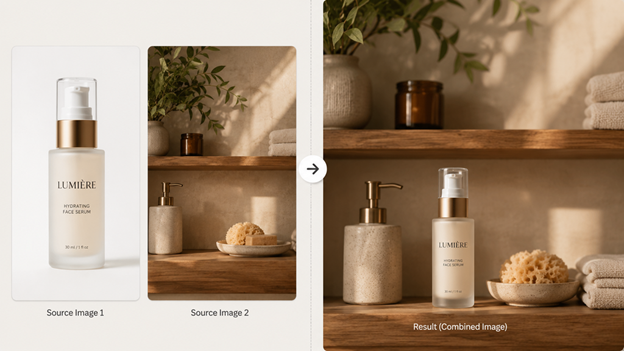
A small skincare brand has a packshot and a nice photo of a sunlit bathroom shelf. A creator has a portrait plus a moodier backdrop that fits the post better. A family has separate pictures of people who were never photographed together. The leap from stacking those assets in a layout to making them read as one real photograph is exactly where it gets hard. The lighting has to agree. The shadows have to fall the right way. The scale has to feel honest, and the edges can’t betray the seam. Get any of that wrong and the eye catches the fake instantly.
That’s why combining is worth taking seriously. It sits right in the middle of the creative process — between having the parts and having something finished.
A Workflow That Matches How People Actually Think
What makes Pixlio’s combiner usable is that it’s organized around plain intentions instead of technical steps. You upload your images and pick how they should come together: Product in Scene, Subject into Background, Bring People Together, Creative Blend, or Auto Combine when you’d rather let the tool decide. If you want more say, there’s an optional guidance field where you can spell out what each image should contribute.
That mapping matters more than it looks. People almost always know what they want in everyday language. They don’t think “composite the foreground subject onto a new plate.” They think “put this bottle on that shelf,” or “drop this person into that background,” or “make these two portraits look like one photo.” Letting someone describe the outcome instead of the procedure is most of the value.
It also fits into a longer flow. You might not stop at one merge. You could generate a supporting visual with another Pixlio tool, combine it with a product shot, then keep refining from there — all in the same place. That’s the quiet advantage of an all-in-one setup over a drawer full of disconnected single-trick apps.
One Example Makes It Concrete
Picture a founder putting together a product page.
They have a crisp studio shot of a glass skincare bottle. Useful, but lonely on its own. They also have a separate photo of a softly lit bathroom shelf — warm morning light, a folded towel, a couple of natural details in the background.
The old way: cut out the bottle, place it on the shelf, size it correctly, rework the highlights, paint in contact shadows, and keep nudging until it stops looking like a sticker. The combiner way: upload both images, choose Product in Scene, and add a short note to keep the product looking exactly like itself while it settles naturally into the room.
The reason a demo like this lands is that you don’t need anything explained. You can see the jump from scattered source files to one image that looks ready for a real page.
Useful for Work, Fun for Play
The nice thing about a tool like this is that it doesn’t belong to a single audience.
Ecommerce sellers can turn plain catalog shots into product-in-scene visuals. Marketers can rough out ad and campaign concepts in minutes. Bloggers and creators can make graphics that look like theirs instead of leaning on the same stock photos as everyone else. Indie founders can knock out landing page art, social posts, and launch assets without booking a designer.
And then there’s the playful side. Combine a portrait with an imaginary backdrop. Put separate people — or pets — into one frame. Build a stylized concept image just to see how it feels. That mix of practical and playful is a big part of why these tools feel relevant now. They’re not just novelty generators; they’ve turned into genuinely handy assistants for everyday visual work.
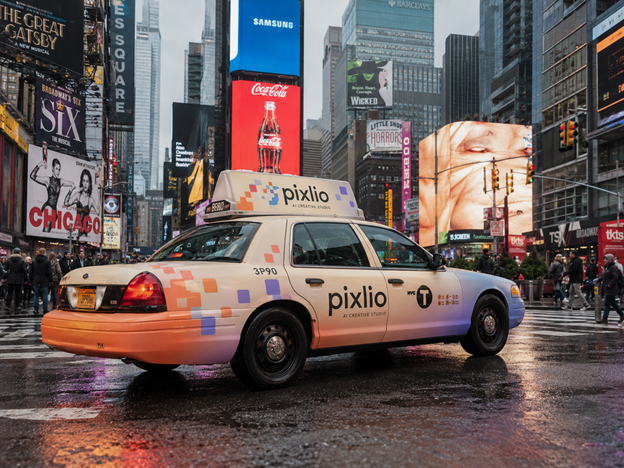
Pixlio branding blends into a rainy Times Square taxi scene.
Better Images Usually Come From Better Middle Steps
There’s a myth that the point of AI creativity is one perfect image from one perfect click. Most good visuals don’t work that way. They come from better middle steps: you start with a few pieces, a tool helps them come together, and then you judge, adjust, and keep what works.
That’s what makes Pixlio’s combiner worth using. It isn’t trying to replace your taste. It’s trying to take the technical weight out of getting from fragments to a coherent image — saving time, lowering the cost of experimenting, and making the whole thing feel approachable.
When good images come in pieces, the real advantage is having something that can put them back together. Pixlio AI does that in a way that stays practical, flexible, and close to how people actually make visual content today.